Best PDF OCR Software for Developers (2026)
Seven PDF OCR tools ranked for developers: searchable PDFs vs structure from scans, with real scanned-page output and list prices per 1,000 pages.
The HyperAPI TeamProduct
On this page
- The short answer: two jobs, two winners
- How did we rank PDF OCR software?
- PDF OCR software compared
- 1. HyperAPI: best for structure from scanned pages
- 2. OCRmyPDF + Tesseract: best free searchable PDFs
- 3. Azure Document Intelligence Read: best searchable PDF from a cloud API
- 4. Google Enterprise Document OCR: best OCR add-ons on Google Cloud
- 5. AWS Textract DetectDocumentText: plain lines and words on AWS
- 6. Mistral OCR: best markdown from scans
- 7. Adobe Acrobat Pro: best for OCR by hand
- What do 100,000 scanned pages cost with headings and tables?
- Which PDF OCR software should you use?
- Frequently asked questions
For developers who need structure from scanned PDFs, the best PDF OCR software is HyperAPI by Hyperbots: its fast parse returns word and line boxes, typed blocks, heading levels and tables from an image-only page for $1 per 1,000 pages. If all you need is a searchable PDF, use OCRmyPDF. It is free, runs on your own machine and wins that job outright.
Published by HyperAPI. We rank ourselves first on the criteria below; check them against your own documents. Last updated: 18 November 2026.
The short answer: two jobs, two winners
“PDF OCR” covers two different jobs. Pick the tool by the output you need, not by the word OCR.
| Job | Our pick | What you get | List price |
|---|---|---|---|
| Get structure from scanned pages (for code, search or a language model) | HyperAPI fast parse | JSON: page text, word and line boxes with confidence, typed blocks, heading levels, tables as HTML and positions, sections | $1 per 1,000 pages |
| Make a scanned PDF searchable and selectable | OCRmyPDF (Tesseract inside) | The same PDF with an invisible text layer (PDF/A by default), plus an optional text file | Free; your own CPU time |
The rest of this guide ranks seven tools a developer would put on a shortlist: HyperAPI, OCRmyPDF, Azure Document Intelligence Read, Google Enterprise Document OCR, AWS Textract DetectDocumentText, Mistral OCR and Adobe Acrobat Pro. Each one gets the job it is best for.
How did we rank PDF OCR software?
We ranked on things you can check on a pricing page or in an API response, not on accuracy. Accuracy depends on your scans, so test it on your own files.
- Structure per $1,000 pages: what comes back from a scanned page at the list price: word boxes, typed blocks, heading levels, tables, sections.
- Searchable PDF: whether the tool writes a PDF with a text layer, or only returns data.
- Free tier and inputs: what you can test without paying, and which file types it takes.
Vendor facts come from public pages read on 17 and 18 November 2026; we called no paid competitor API. Error rates appear only for the open-source engines, which we ran ourselves.
PDF OCR software compared
| Tool | OCR tier, per 1,000 pages | Word boxes | Headings and tables | Searchable PDF | Free to try |
|---|---|---|---|---|---|
| HyperAPI fast parse | $1 | Yes, words and lines, with confidence | Included: typed blocks, heading levels, tables as HTML and positions, sections | No (JSON) | 30 pages a month, no card; free one-page tools |
| OCRmyPDF + Tesseract | Free (open source, MPL-2.0 and Apache-2.0) | Yes, from Tesseract (TSV, hOCR, ALTO) | No; Tesseract returns blocks and paragraphs without types | Yes, its main job | Free |
| Azure Document Intelligence Read | $1.50 ($0.60 above 1M a month) | Yes, with polygons and confidence | Paragraphs only; Layout model at $10 | Yes, at no extra cost | 500 pages a month (F0), first two pages of each file |
| Google Enterprise Document OCR | $1.50 ($0.60 above 5M); add-ons $6 | Yes, down to symbols | Blocks and paragraphs; Layout Parser at $10 | No (JSON) | First 1,000 pages a month; $300 credit for new customers |
| AWS Textract DetectDocumentText | $1.50 ($0.60 above 1M) | Yes, lines and words | No; Layout $4, Tables (with Layout) $15 | No (JSON) | 1,000 pages a month for three months (new customers) |
| Mistral OCR 4.1 | $4 ($2 in batch) | No; paragraph-level blocks, word confidence | Yes, as markdown; tables as markdown or HTML | No (JSON) | No API free tier |
| Adobe Acrobat Pro | Seat subscription; PDF Services API by quote | No (PDF output) | No | Yes | API: 500 document transactions a month |
Two columns decide the ranking. Of the seven tools here, only HyperAPI returns headings and tables from a scan at $1.50 or less per 1,000 pages. The three clouds sell them in layout tiers at $4 to $15 per 1,000 pages, and Mistral returns them as markdown at $4 with no word boxes.
Reducto's r-1 mini Parse lists at $1 per 1,000 pages ($0.80 with its 20% batch discount, so it is cheaper in batch). It returns title, section header and table blocks with positions, and it returns markdown, which fast parse does not. Where HyperAPI differs: its headings carry a level, and fast parse takes spreadsheets, which r-1 mini does not accept. Fast parse also includes word boxes in its $1; r-1 mini charges $1 per 1,000 pages more for them.
1. HyperAPI: best for structure from scanned pages
HyperAPI is a document API with five operations on one key: parse, extract, classify, split and redact. Parse in fast mode is the OCR product, at $0.001 per page. For each page it returns the text, word and line boxes, and typed layout blocks. A block's type is one of a fixed public list (title, heading, text, list, table, caption, figure, page_number and so on), and headings carry their level.
Tables come back as table blocks with text and positions, and as HTML by default. Table HTML is best-effort: a table it can't parse is marked. Blocks are grouped into sections; headers, footers and page numbers are marked as page furniture; and tables that continue across pages are linked.
Why HyperAPI leads
- One price for the whole structure. $1 per 1,000 pages covers boxes, typed blocks, headings, tables and sections. On the three clouds the same kind of output means switching to a $10 or $15 layout tier.
- Word boxes and structure in one response. Match each word's box to the block and section that contain it, with no second call to join.
- Any input in one call. PDF, PNG, JPEG, WebP, TIFF, HEIC, Word, Excel, PowerPoint, CSV, TXT and RTF, up to 50 MB per file, scanned or born-digital.
What it returned for an image-only scan
This is page 961 of the Federal Register for 22 February 1950: three columns, scanned at 100 DPI, with no text layer. We sent it through fast parse as a one-page PDF. The boxes below are the typed blocks the API returned, drawn on the page.
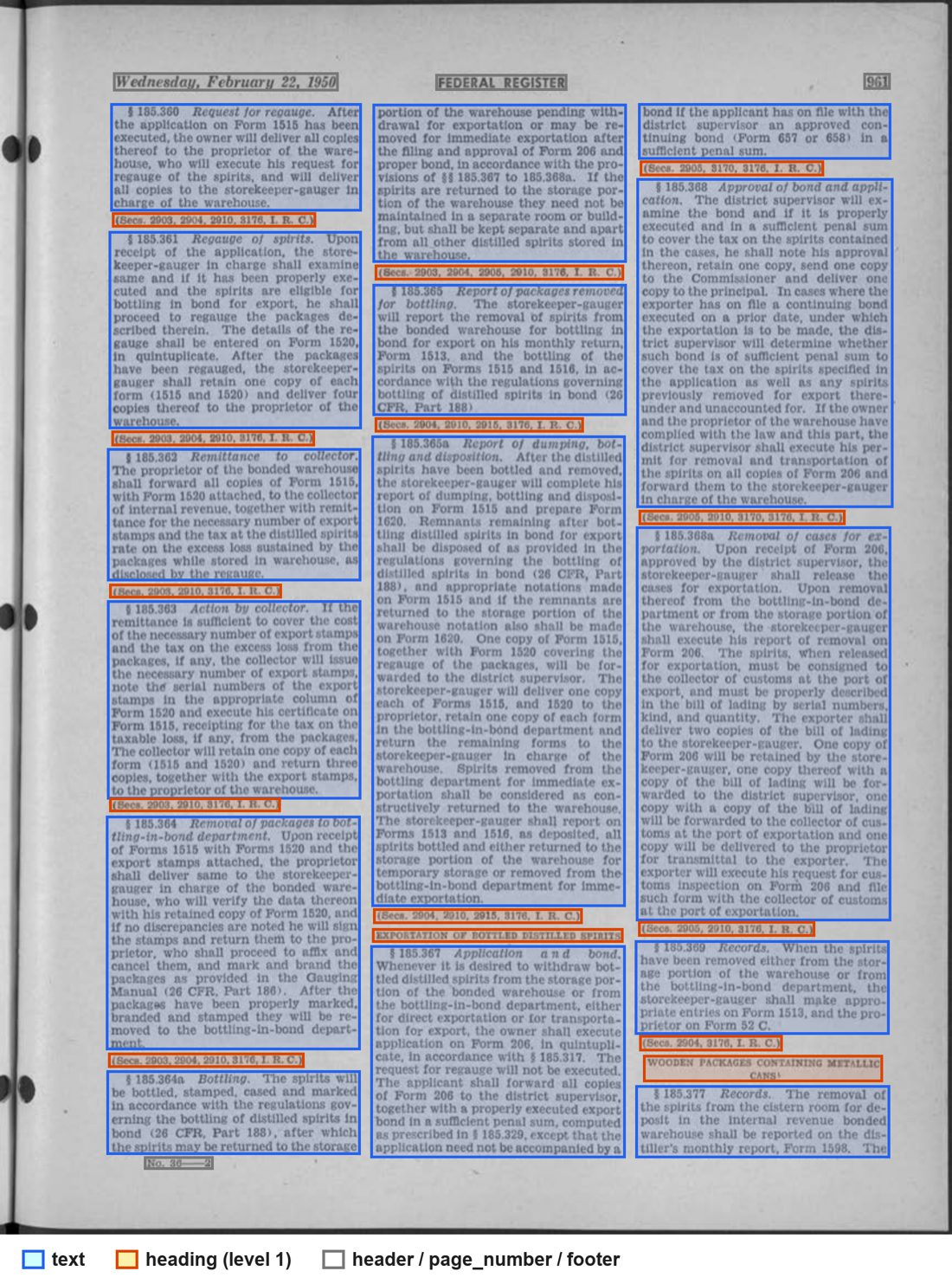
blocks: blue is text, orange is heading, grey is page furniture.From that one page the response held 1,486 word boxes, 240 line boxes and 33 blocks: 15 text, 14 heading (all at level 1), 2 header, 1 page_number and 1 footer. The header, page number and footer blocks are flagged as furniture, so you can drop them in one line of code. The blocks sit in 17 groups, 14 of them sections. This is one section, trimmed:
json
"blocks": [
  { "id": "b1-20", "order": 20, "page": 1, "type": "heading", "heading": 1,
    "bbox": [675, 1684, 1131, 1710], "group": "g10" },
  { "id": "b1-21", "order": 21, "page": 1, "type": "text",
    "bbox": [672, 1715, 1135, 2101], "group": "g10" },
  { "id": "b1-22", "order": 22, "page": 1, "type": "text",
    "bbox": [1158, 187, 1617, 289], "group": "g10" }
],
"groups": [
  { "id": "g10", "kind": "section", "level": 1, "heading": "b1-20",
    "children": ["b1-20", "b1-21", "b1-22"], "pages": [1] }
]
The heading is “Exportation of bottled distilled spirits”. Its section holds the paragraph at the foot of the middle column and the one at the top of the right-hand column, so the text that runs across the column break stays together. One thing to check on your own files: the twelve bracketed citation lines on this page (“(Secs. 2903, 2904…)”) also came back as headings, so most sections here start at a citation rather than at the § number.
Word boxes on a scanned form
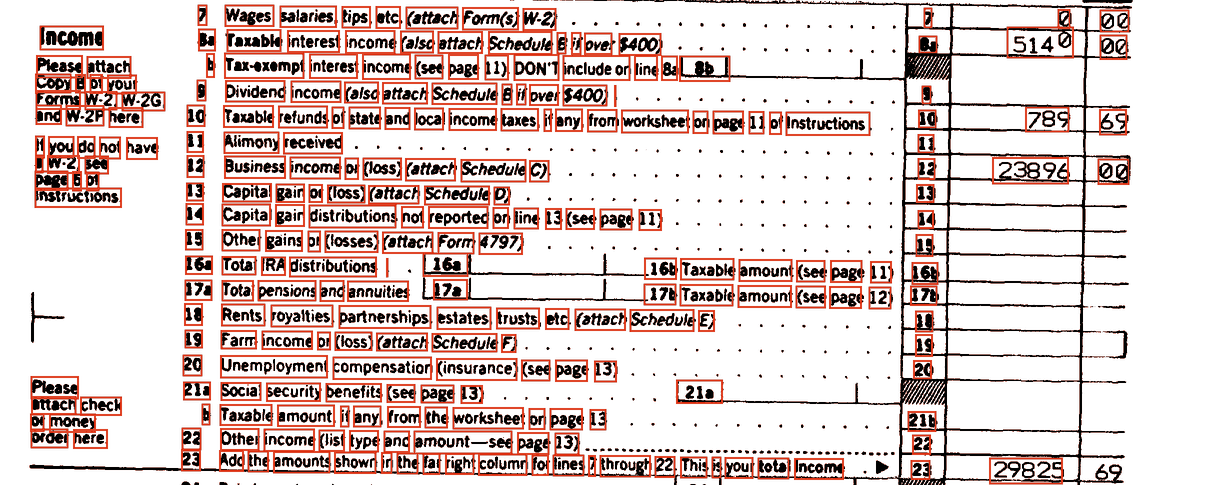
Next, a 300 DPI black-and-white scan of a 1988 IRS Form 1040 from NIST Special Database 2. Its entries are computer-generated, so the names and numbers on it are not real. The red boxes are the word boxes the API returned for the income section, drawn on the original scan.
word_boxes.json
"word_boxes": [
  { "text": "29825", "bbox": [1402, 1654, 1500, 1688], "confidence": 1 }
  // ... 817 word boxes on this page, plus 212 line boxes
]
Each amount has coordinates you can match to its line number. The form grid itself came back as one table block, so on a form like this the value is in the boxes. The output is not perfect: the header reads “Depertment of the Treasury”, and on line 31 the dollars and cents came back joined as “2982569”.
And a phone photo of a receipt
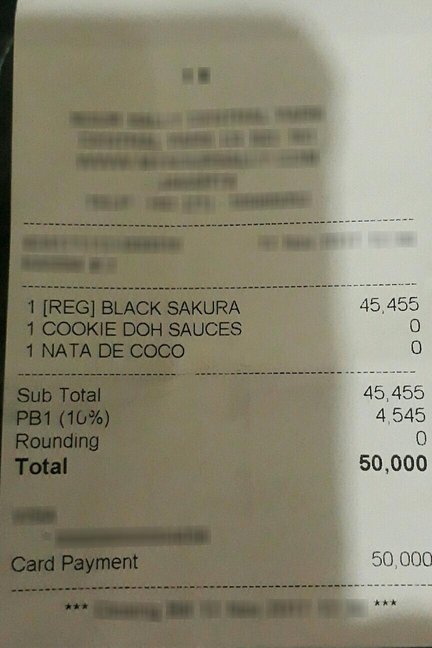
The page text came back like this, from 18 line boxes and 29 word boxes. The last line is the blurred footer, returned as junk:
text
  1 [REG] BLACK SAKURA          45,455
  1 COOKIE DOH SAUCES                0
  1 NATA DE COCO                     0
  Sub Total                     45,455
  PB1(10%)                       4,545
  Rounding                           0
  Total                         50,000

  Card Payment                   50,000
     羊草羊                         ★★★
For named fields (total, tax, items), run the extract operation ($0.05 per page) on the same uploaded file.
How to call it
Every operation works the same way: upload the file to get a document_key, then call the operation with it. In Python with requests:
python
import os
import requests

API = "https://apis.hyperbots.com"
HEADERS = {"X-API-Key": os.environ["HYPERAPI_KEY"]}
path = "scan.pdf"

# 1. Ask for an upload URL and a document_key
up = requests.post(f"{API}/v1/documents/upload", headers=HEADERS, json={
    "filename": "scan.pdf",
    "content_type": "application/pdf",
    "content_length": os.path.getsize(path),
}).json()

# 2. PUT the file bytes to the upload URL (no API key on this request)
with open(path, "rb") as f:
    requests.put(up["upload_url"], data=f, headers={
        "Content-Type": "application/pdf",
        "x-amz-server-side-encryption": "AES256",
    }).raise_for_status()

# 3. Parse in fast mode
resp = requests.post(f"{API}/v1/parse", headers=HEADERS,
                     params={"mode": "fast"},
                     files={"document_key": (None, up["document_key"])},
                     timeout=900).json()

result = resp["result"]
for page in result["pages"]:
    print(page["page_number"], len(page["word_boxes"]), "word boxes")
for block in result["blocks"]:
    print(block["page"], block["type"], block.get("heading"), block["bbox"])
The same three steps with cURL:
bash
RESP=$(curl -s -X POST "https://apis.hyperbots.com/v1/documents/upload" \
  -H "X-API-Key: $HYPERAPI_KEY" -H "Content-Type: application/json" \
  -d '{"filename":"scan.pdf","content_type":"application/pdf","content_length":'"$(wc -c < scan.pdf | tr -d ' ')"'}')
KEY=$(echo "$RESP" | python3 -c "import sys,json; print(json.load(sys.stdin)['document_key'])")
URL=$(echo "$RESP" | python3 -c "import sys,json; print(json.load(sys.stdin)['upload_url'])")

curl -s -X PUT "$URL" -H "Content-Type: application/pdf" \
  -H "x-amz-server-side-encryption: AES256" --data-binary @scan.pdf

curl -s -X POST "https://apis.hyperbots.com/v1/parse?mode=fast" \
  -H "X-API-Key: $HYPERAPI_KEY" -F "document_key=$KEY" > scan.json
The Python SDK wraps all three steps in one call. It installs from GitHub, not PyPI:
python
# pip install "hyperapi-sdk @ git+https://github.com/hyprbots/hyperapi-sdk.git"
from hyperapi import HyperAPIClient

client = HyperAPIClient()               # reads HYPERAPI_KEY
resp = client.parse("scan.pdf", mode="fast")
print(resp["result"]["pages"][0]["text"][:300])
Each request's input and result are kept for 30 days, retrievable by request_id, then deleted, and they are not used for training. Sending the same document again within 24 hours returns the stored result at no charge. HyperAPI is SOC 2 Type II.
Where HyperAPI is not the right pick
- It does not write a searchable PDF. Parse returns JSON. For a PDF with a text layer, use OCRmyPDF.
- Fast parse has no markdown. Advanced parse adds markdown and structured HTML at $0.05 per page, on the Plus plan ($25 a month) or higher; Free and Starter accounts get a 403.
- The free tier allows one request a minute, which is enough to test but not to load-test.
2. OCRmyPDF + Tesseract: best free searchable PDFs
OCRmyPDF adds an invisible text layer to the images in a PDF so you can search and select the text. It runs Tesseract for the OCR and writes PDF/A-2b by default. Install it with brew install ocrmypdf, apt install ocrmypdf or pip install ocrmypdf, then:
bash
ocrmypdf --skip-text --rotate-pages --sidecar scan.txt scan.pdf scan-ocr.pdf--skip-text leaves pages that already have text alone, --rotate-pages turns sideways scans upright, and --sidecar writes the recognised text to a file. We ran OCRmyPDF 17.12.1 with Tesseract 5.5.1 on an Apple M1 MacBook Pro, one page at a time:
- 13 image-only scans (US government pages from 1950 and a NACA annual report) took 3.1 to 3.2 CPU-seconds per page over three runs.
- On a 63-page mixed file,
--skip-textskipped the 48 pages that already had text and OCRed the other 15 (the 13 scans and two blank pages). - A page scanned sideways came back as gibberish without
--rotate-pages. With it, 98.86% of the words matched an OCR of the same page upright. - The Federal Register pages were scanned at 100 DPI and the 1950 Congressional Record pages at 150. Tesseract's own docs say it works best at 300 DPI or more, so expect more slips on scans like these.
For character error rates, we ran Tesseract and two other open-source engines on 40 public-domain and CC BY pages rendered at 300 DPI (38 scored for CER; two pages had unmapped glyphs in their text layer). These were clean renders, so expect higher error rates on real scans:
| Engine (open source) | Tesseract 5.5.1 | docTR 1.1.0 | EasyOCR 1.7.2 |
|---|---|---|---|
| Median CER, single column | 0.19% | 0.31% | 2.86% |
| Median CER, two columns | 8.32% | 13.49% | 72.65% |
| Median CER, three columns | 2.41% | 65.71% | 74.06% |
| CPU-seconds per page | 2.6 | 37.9 | 34.0 |
CER is the share of characters wrong against the page's own text layer. The high multi-column figures for docTR and EasyOCR are mostly reading order: they found most of the words (94–97% and 91–92%) but read across the columns. The full method and scripts are in Tesseract vs EasyOCR vs docTR, and the scanned-PDF workflow is in how to extract text from a scanned PDF.
Best for: a searchable archive, files that must stay on your machine, and anyone with spare CPU. It stops at text: no table cells, no headings, no sections.
3. Azure Document Intelligence Read: best searchable PDF from a cloud API
The Read model costs $1.50 per 1,000 pages ($0.60 above one million a month). It returns paragraphs, lines and words with polygons and confidence, detects languages and handwriting, and accepts PDF, JPEG, PNG, BMP, TIFF, HEIF and Office files. Of the three big clouds, it is the only one whose OCR call writes a searchable PDF, at no added cost.
Headings and tables need the Layout model at $10 per 1,000 pages. The free F0 tier gives 500 pages a month but processes only the first two pages of each file.
Best for: teams already on Azure who want a searchable PDF and word coordinates from one managed call.
4. Google Enterprise Document OCR: best OCR add-ons on Google Cloud
Enterprise Document OCR lists at $1.50 per 1,000 pages ($0.60 above five million), and the first 1,000 pages a month are free. It returns blocks, paragraphs, lines, words and symbols, plus a page-level image-quality score with reasons such as blurry, dark or faint. Add-ons for math formulas, font style and checkboxes cost $6 per 1,000 pages more.
Headings and tables need Layout Parser at $10 per 1,000 pages. It accepts PDF, TIFF, GIF, JPEG, PNG, BMP and WebP.
Best for: Google Cloud teams who want to route bad scans by quality score before anyone reads them.
5. AWS Textract DetectDocumentText: plain lines and words on AWS
DetectDocumentText returns a PAGE block, its LINE blocks and their WORD blocks, each with geometry and confidence, for $1.50 per 1,000 pages ($0.60 above one million). It takes JPEG, PNG, PDF and TIFF.
The synchronous call handles one page; multi-page PDFs go through the asynchronous call (up to 3,000 pages). Headings come from AnalyzeDocument Layout ($4) and table cells from Tables ($15, Layout included). New AWS customers get 1,000 pages a month free for three months.
Best for: AWS workloads that need only text and coordinates, inside existing IAM and billing.
6. Mistral OCR: best markdown from scans
Mistral OCR 4.1 costs $4 per 1,000 pages, or $2 in batch. It returns markdown per page with headings and tables, and can return tables separately as markdown or HTML. With include_blocks it adds paragraph-level boxes with labels.
It has no word or line boxes; word confidence values come without coordinates. The API has no free tier.
Best for: feeding scans to a language model as markdown. Among the seven ranked here, Mistral wins this one on price: HyperAPI's markdown comes from advanced parse at $0.05 per page. Reducto's r-1 mini, outside this list, returns markdown for less ($1 per 1,000 pages, $0.80 in batch).
7. Adobe Acrobat Pro: best for OCR by hand
Acrobat Pro's Scan & OCR tool turns a scan into a searchable, editable PDF from the desktop. It is sold as a per-seat subscription, priced by country. For code, Adobe's PDF Services API has an OCR operation that takes a PDF and returns a searchable PDF. Its free tier is 500 document transactions a month; paid volumes are by quote.
Best for: people OCRing a few files a week, and companies that already pay for Acrobat.
What do 100,000 scanned pages cost with headings and tables?
At list price, for output that includes headings and tables. Free tiers are ignored, and none of these volumes crosses a price tier.
| Tool and tier | Per 1,000 pages | 100,000 pages | Word boxes in the same call |
|---|---|---|---|
| HyperAPI fast parse | $1 | $100 | Yes |
| Reducto r-1 mini (batch) | $0.80 | $80 | Yes, as an add-on: +$1 per 1,000 pages |
| Reducto r-1 mini | $1 | $100 | Yes, as an add-on: +$1 per 1,000 pages |
| Mistral OCR 4.1 (batch) | $2 | $200 | No |
| Mistral OCR 4.1 | $4 | $400 | No |
| Azure Layout | $10 | $1,000 | Yes |
| Google Layout Parser | $10 | $1,000 | Not documented for Layout Parser; Enterprise OCR is a separate call |
| AWS Textract Tables (Layout included) | $15 | $1,500 | Yes |
Reducto's word boxes come from its citations or OCR data add-on, so r-1 mini with word boxes lists at $2 per 1,000 pages ($200 per 100,000 pages).
OCRmyPDF is not in this table because it returns no headings or tables. For plain text, its cost is your CPU: at the 3.2 CPU-seconds per page we measured, 100,000 pages is about 89 CPU-hours. For more on parsing APIs beyond OCR, see the best document parsing APIs.
Which PDF OCR software should you use?
- You need a searchable PDF: OCRmyPDF on your own machine; Azure Read if it must be a managed API.
- You need boxes, headings and tables in JSON: HyperAPI fast parse at $1 per 1,000 pages. See the parse API reference for the full field list.
- You need markdown for a language model: Reducto r-1 mini or Mistral OCR on price, or HyperAPI advanced parse if you also want the other operations on the same key.
- You must stay inside one cloud: that cloud's OCR, and budget for its layout tier if you need structure.
Frequently asked questions
What is the best PDF OCR software for developers?
For structure from scanned PDFs, HyperAPI fast parse: word and line boxes, typed blocks, heading levels and tables for $1 per 1,000 pages. For a searchable PDF, OCRmyPDF, which is free and runs locally.
Is there free OCR software for PDF documents?
Yes. OCRmyPDF and Tesseract are free and open source. Among the APIs, HyperAPI gives 30 pages a month with no card, Google Enterprise Document OCR the first 1,000 pages a month, and Azure's F0 tier 500 pages a month (two pages per file).
Which OCR software returns tables and headings from a scanned PDF?
HyperAPI fast parse returns them at its base price of $1 per 1,000 pages. Reducto r-1 mini lists at $1 ($0.80 in batch), Azure Layout and Google Layout Parser at $10, AWS Textract Tables at $15, and Mistral OCR returns them as markdown at $4.
Can OCR make a scanned PDF searchable?
Yes. OCRmyPDF, Azure Read and Adobe Acrobat write a PDF with an invisible text layer over the scan. HyperAPI, Google and Textract return JSON instead.
What is the most accurate PDF OCR software?
It depends on your scans: resolution, columns, tables and handwriting all change the result. In our runs on clean public-domain and CC BY pages, Tesseract had a 0.19% median character error rate on single-column pages and 8.32% on two-column pages. Test any tool on a sample of your own files.