How to Extract Text From a Scanned PDF (Python + API)
Upload a scanned PDF, call HyperAPI fast parse, and read text, word boxes and typed blocks. Python and cURL with real output, plus a free OCRmyPDF route.
The HyperAPI TeamProduct
On this page
- The short answer
- Step 1: get an API key
- Step 2: upload the scanned PDF
- Step 3: call fast parse
- Step 4: read the text, word boxes and blocks
- Which pages of a PDF actually need OCR?
- The free route: a searchable PDF with OCRmyPDF
- Scanned PDF to text: which route fits?
- Why HyperAPI for scanned PDFs
- Frequently asked questions
- How we tested
To extract text from a scanned PDF in code, send it to an OCR API and read the JSON that comes back. With HyperAPI by Hyperbots that takes three requests: ask for an upload URL, upload the file, then call fast parse with the document_key you were given. Fast parse costs $0.001 per page. It returns each page's text, word and line boxes, and typed layout blocks, so you get the words, where they sit on the page, and what each block is.
Last updated: 18 November 2026
This guide walks through each request in Python and cURL, with the real response for an image-only page of the 1950 Federal Register. It then shows a short script that finds which pages of a PDF need OCR at all, tested on 63 public pages, and the free route with OCRmyPDF for when you want a searchable PDF rather than JSON.
The short answer
- Get an API key. The free tier is 30 pages a month, with no card.
- Upload the PDF.
POST /v1/documents/uploadreturns adocument_keyand an upload URL; youPUTthe file to that URL. - Call fast parse.
POST /v1/parse?mode=fastwith thedocument_key. - Read the result.
pages[].textholds the text,word_boxesthe position of each word, andblocksthe typed blocks in reading order.
Want a searchable PDF on your own machine instead? Skip to the free route with OCRmyPDF.
Step 1: get an API key
Sign up and create a key in the dashboard. Keys start with hk_live_ or hk_test_. The examples below read it from an environment variable, which is also where the Python SDK looks:
bash
export HYPERAPI_KEY=hk_live_your_key_hereThe quickstart covers the same setup in more detail.
Step 2: upload the scanned PDF
Uploading is two requests. The first sends the file name and size and gets back a document_key and a short-lived upload URL; the second sends the bytes to that URL, with no API key. The key then works for 24 hours, so one upload can feed parse and any other operation. Full reference: Upload API.
bash
# 1. Ask for an upload URL and a document_key
RESP=$(curl -s -X POST "https://apis.hyperbots.com/v1/documents/upload" \
  -H "X-API-Key: $HYPERAPI_KEY" -H "Content-Type: application/json" \
  -d '{"filename":"scan.pdf","content_type":"application/pdf","content_length":'"$(wc -c < scan.pdf | tr -d ' ')"'}')
KEY=$(echo "$RESP" | python3 -c "import sys,json; print(json.load(sys.stdin)['document_key'])")
URL=$(echo "$RESP" | python3 -c "import sys,json; print(json.load(sys.stdin)['upload_url'])")

# 2. Send the file bytes (no API key on this request; both headers are required)
curl -s -X PUT "$URL" -H "Content-Type: application/pdf" \
  -H "x-amz-server-side-encryption: AES256" --data-binary @scan.pdf
The same two requests in Python, with requests:
python
import os
import requests

API = "https://apis.hyperbots.com"
HEADERS = {"X-API-Key": os.environ["HYPERAPI_KEY"]}
path = "scan.pdf"

# 1. Ask for an upload URL and a document_key
up = requests.post(f"{API}/v1/documents/upload", headers=HEADERS, json={
    "filename": os.path.basename(path),
    "content_type": "application/pdf",
    "content_length": os.path.getsize(path),
})
up.raise_for_status()
up = up.json()

# 2. Send the file bytes (no API key on this request; both headers are required)
with open(path, "rb") as f:
    requests.put(up["upload_url"], data=f, headers={
        "Content-Type": "application/pdf",
        "x-amz-server-side-encryption": "AES256",
    }).raise_for_status()

document_key = up["document_key"]
Step 3: call fast parse
Send the document_key as a form field. fast is the default mode; naming it keeps the request explicit. Every parameter is listed in the Parse API reference.
bash
curl -s -X POST "https://apis.hyperbots.com/v1/parse?mode=fast" \
  -H "X-API-Key: $HYPERAPI_KEY" \
  -F "document_key=$KEY" -o scan.parse.json
python
r = requests.post(
    f"{API}/v1/parse",
    params={"mode": "fast"},
    headers=HEADERS,
    files={"document_key": (None, document_key)},  # sent as a multipart form field
)
r.raise_for_status()
result = r.json()
print(result["request_id"])          # keep this: the result can be fetched again for 30 days
page = result["result"]["pages"][0]
print(page["text"][:300])
For long files, add the header X-Async: true to get a job ID back and poll it; see async mode. If you would rather not handle the upload yourself, the Python SDK does both steps in one call. It installs from GitHub, not PyPI:
python
# pip install "hyperapi-sdk @ git+https://github.com/hyprbots/hyperapi-sdk.git"
from hyperapi import HyperAPIClient

client = HyperAPIClient()                     # reads HYPERAPI_KEY
result = client.parse("scan.pdf", mode="fast")  # uploads, parses, returns the same JSON
print(result["result"]["pages"][0]["text"][:300])
Step 4: read the text, word boxes and blocks
Here is what came back for a real scan. The page is page 961 of the Federal Register for 22 February 1950 (public domain, via GovInfo): a three-column page scanned at 100 DPI on yellowed paper. We saved it as a PDF that holds only the scanned image, with no text layer at all (0 characters), and ran fast parse on it on 18 November 2026. This is the response's result object, trimmed: arrays cut, runs of spaces shortened, and the inline markup inside html left out.
json
{
  "pages": [{
    "page_number": 1,
    "dimensions": { "width": 1728, "height": 2240 },
    "page_size": { "width": 623.55, "height": 808.31, "unit": "pt" },
    "text": "  Wednesday, February 22, 1950     FEDERAL REGISTER     961\n   §185.360 Request for regauge. After     portion of the warehouse pending with-  ...",
    "boxes": [
      { "text": "the spirits may be returned to the storage", "bbox": [198, 2068, 649, 2094], "confidence": 1 },
      ...
    ],
    "word_boxes": [
      { "text": "accompanied", "bbox": [936, 2070, 1077, 2096], "confidence": 0.9908 },
      ...
    ]
  }],
  "blocks": [
    { "id": "b1-0", "order": 0, "page": 1, "type": "header", "furniture": true, "bbox": [205, 131, 614, 165], "group": "g0", ... },
    { "id": "b1-2", "order": 2, "page": 1, "type": "page_number", "furniture": true, "bbox": [1567, 132, 1616, 162], "group": "g0", ... },
    { "id": "b1-3", "order": 3, "page": 1, "type": "text", "bbox": [200, 187, 656, 383], "group": "g1",
      "html": "<div class=block data-type=\"text\" ...>§185.360 Request for regauge. After the application on Form 1515 ...</div>" },
    { "id": "b1-20", "order": 20, "page": 1, "type": "heading", "heading": 1, "bbox": [675, 1684, 1131, 1710], "group": "g10",
      "html": "<div class=block data-type=\"heading\" ...><h1>EXPORTATION OF BOTTLED DISTILLED SPIRITS</h1></div>" },
    ...
  ],
  "groups": [
    { "id": "g10", "kind": "section", "level": 1, "heading": "b1-20", "children": ["b1-20", "b1-21", "b1-22"], "pages": [1] },
    ...
  ]
}
From one image-only page, fast parse returned:
- Text: 11,382 characters in
pages[0].text. - Positions: 240 line boxes and 1,486 word boxes, each with
[left, top, right, bottom]in the pixel space given bydimensions(1728 by 2240 here). Multiply bypage_sizeoverdimensionsto get PDF points. - Typed blocks: 33 blocks: 15
text, 14heading(each with its level), 2header, 1page_numberand 1footer. Those last four blocks carryfurniture: true. - Sections: 17 groups: 14 sections, the text before the first heading, and one group each for the page header and page footer.
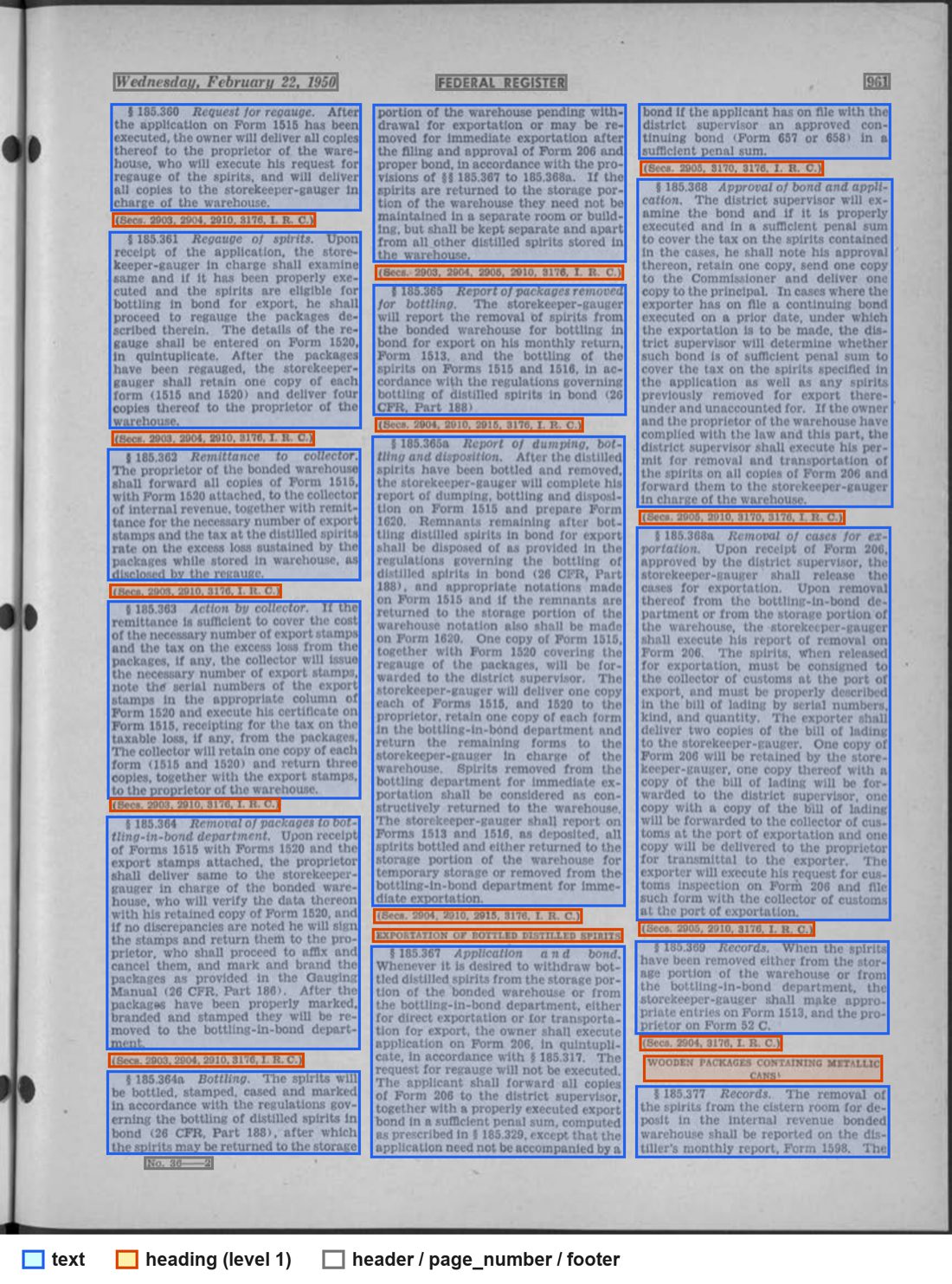
text, orange for heading, grey for header, page_number and footer. Federal Register, 22 February 1950, page 961 (public domain, via GovInfo).Get the text in reading order
pages[].text keeps the page's layout: the three columns sit side by side on each line. That is useful when you want text and positions together, and awkward for search. For reading order, walk the blocks by order and skip page furniture:
python
import html
import re

def block_text(block):
    t = html.unescape(re.sub(r"<[^>]+>", " ", block["html"]))
    t = re.sub(r"\s+", " ", t).strip()
    return re.sub(r"(\w)- (?=[a-z])", r"\1", t)   # rejoin words split at line ends

for block in sorted(result["result"]["blocks"], key=lambda b: (b["page"], b["order"])):
    if block.get("furniture"):
        continue  # running heads, page numbers, footers
    print(f'[{block["type"]}] {block_text(block)}')
On the 1950 page it prints:
text
[text] §185.360 Request for regauge. After the application on Form 1515 has been executed, the owner will deliver all coples thereof to the proprletor of the warehouse, ...
[heading] (Secs. 2903, 2904, 2910, 3176, I. R. C.)
[text] 185.361 Regauge of spirits. Upon receipt of the application, the storekeeper-gauger in charge shall examine same ...
...
[heading] EXPORTATION OF BOTTLED DISTILLED SPIRITS
[text] 185.367Application a n d bond. Whenever it is desired to withdraw bottled distilled spirits ...
The blocks run down column one, then column two, then column three, and the running head, page number and footer are left out. The groups follow the text across columns: the section that opens with “EXPORTATION OF BOTTLED DISTILLED SPIRITS” near the foot of column two also holds the block at the top of column three that finishes its paragraph.
Three things to check on your own pages:
- Heading types. On this page the 14 headings are the two all-capital titles plus the 12 citation lines, such as “(Secs. 2903, 2904, 2910, 3176, I. R. C.)”, that close each section.
- Misreads. At 100 DPI the text has errors such as “coples”, “proprletor” and “Seca.”. Tesseract's documentation says it “works best on images which have a DPI of at least 300 dpi”, and the same advice suits any OCR: rescan at 300 DPI if you can, and check every number you extract from a low-resolution scan.
- Hyphens. The rejoin step also joins a word that really is hyphenated when it breaks at its hyphen (“storekeeper-gauger” became “storekeepergauger” twice on this page). If that matters, keep the hyphen when the joined word appears nowhere else in the document.
Which pages of a PDF actually need OCR?
With the API you send the whole file. The question still matters if you take the free route below, or want to know what is in a folder of PDFs. Most real files are mixed, and the usual test (“no text layer means scanned”) fails because many scans already carry a hidden OCR layer: invisible text placed over the image by whoever scanned it. Every scan we downloaded for this post had one.
This script checks two signals per page, the character count and how much of the page images cover, and needs only pdfplumber.
python
# check_pages.py: label each page of a PDF as digital, scanned, or nearly empty.
# Usage: python check_pages.py file.pdf      (pip install pdfplumber)
import sys
import pdfplumber

MIN_CHARS = 50     # fewer characters than this: no usable text layer
FULL_PAGE = 0.85   # images covering this share of the page: a scan

def image_coverage(page):
    covered = 0.0
    for im in page.images:
        w = min(im["x1"], page.width) - max(im["x0"], 0)
        h = min(im["bottom"], page.height) - max(im["top"], 0)
        covered += max(w, 0) * max(h, 0)
    return min(covered / (page.width * page.height), 1.0)

def classify(page):
    chars, cover = len(page.chars), image_coverage(page)
    if cover >= FULL_PAGE:
        kind = "scanned, has OCR text" if chars >= MIN_CHARS else "scanned, needs OCR"
    else:
        kind = "digital text" if chars >= MIN_CHARS else "little or no text"
    return kind, chars, cover

with pdfplumber.open(sys.argv[1]) as pdf:
    for n, page in enumerate(pdf.pages, start=1):
        kind, chars, cover = classify(page)
        print(f"{n}\t{kind}\t{chars} chars\t{cover:.0%} image")
We built one 63-page PDF from public-domain US government documents (the 2024 Economic Report of the President, Federal Register issues from 2024 and 1950, the 1950 Congressional Record and a NACA report) and labelled every page by eye before running the check:
| Our label | Pages | Per-page check said | “No text means scanned” said |
|---|---|---|---|
| Born-digital | 30 | 26 digital text, 4 little or no text | 28 digital, 2 scanned |
| Scanned, with hidden OCR layer | 20 | 20 scanned, has OCR text | 20 digital |
| Scanned, image only | 13 | 13 scanned, needs OCR | 13 scanned |
The two-signal check put no page on the wrong side of the scanned/digital line; the four “little or no text” pages are a blank page, a page number, a 34-character half-title and a back cover. The one-signal test called all 20 pre-OCRed scans digital. Only 13 of the 63 pages needed OCR. The thresholds were set before the run; a page with a full-bleed background photo would read as a scan, and our set had none.
Do not OCR the born-digital pages “to be safe”. We forced OCR over 10 of them with OCRmyPDF: 5.69% of 53,177 characters changed (0.32% on plain prose, 33.90% on a table of contents), “AI” became “Al”, and the file grew from 0.63 MB to 21.7 MB. A born-digital page's own text is exact.
The free route: a searchable PDF with OCRmyPDF
If you need a searchable PDF rather than JSON, or the documents must not leave your machine, OCRmyPDF is free and open source. It wraps the Tesseract OCR engine, can OCR only the pages that need it, and writes a searchable PDF plus an optional plain-text file. Install it with brew install ocrmypdf or apt install ocrmypdf, then:
bash
ocrmypdf --skip-text --rotate-pages --sidecar scan.txt scan.pdf scan-ocr.pdf--skip-textOCRs only pages without text and copies the rest unchanged. Without it, OCRmyPDF stops with an error when a page already has text.--rotate-pagesturns sideways pages upright. On a NACA page we rotated 90 degrees, OCR without it returned 5,569 characters of gibberish; with it, 98.86% of words matched the upright page.--sidecarwrites the text to a file, one page per form feed. On the three-column 1950 page it kept each column together, while reading the new text layer back with pdfplumber interleaved lines from all three columns.
On our 63-page file it OCRed 15 pages (the 13 image-only scans plus two pages with no text at all) and skipped 48. On the 13 image-only pages, three runs used 3.11 to 3.24 CPU-seconds per page on an Apple M1 laptop. The sidecar is plain text, with no word boxes, block types, heading levels or sections; the searchable PDF keeps word positions in its hidden text layer. For a closer look at the engines themselves, see Tesseract vs EasyOCR vs docTR, tested.
Scanned PDF to text: which route fits?
Published by HyperAPI. We rank ourselves first on the criteria below; check them against your own documents.
Ranked on: fields returned (word boxes, typed blocks, heading levels, sections) and price per 1,000 pages for that structured output.
| Route | What comes back | Cost | Runs where | Best for |
|---|---|---|---|---|
| HyperAPI fast parse | JSON: page text, word and line boxes, typed blocks, headings with level, sections, page furniture marked; tables as HTML plus positions (best-effort) | $0.001 per page ($1 per 1,000); 30 free pages a month | Hosted API, any language over REST | Text plus structure from scans, inside your own code |
| HyperAPI advanced parse | Adds markdown and structured HTML | $0.05 per page ($50 per 1,000), Plus plan or higher | Hosted API | Markdown plus the same document_key for extract, classify, split and redact |
| OCRmyPDF (Tesseract) | Searchable PDF and a plain-text file | Free; 3.1 to 3.2 CPU-seconds per scanned page in our run | Your machine | Searchable PDFs; files that must stay local |
| Adobe Acrobat Pro | Searchable PDF (Scan & OCR, then Recognize Text, per Adobe's help, read 17 November 2026) | Acrobat Pro subscription | Desktop | A handful of files, by hand |
Where others win: OCRmyPDF is free if a searchable PDF is enough; above a million pages a month some OCR APIs charge less for plain text; and for markdown alone some charge less than advanced parse. See the best PDF OCR software comparison, which prices the rival APIs per 1,000 pages and lists the fields each returns.
Why HyperAPI for scanned PDFs
- Structure, not only text. One fast-parse call returns the text, a box for every word and line, a type for every block, heading levels, sections, and tables as HTML with positions (best-effort; a table it cannot parse is marked). Tables that continue onto the next page are linked.
- $1 per 1,000 pages, with 30 free pages a month and no card. See pricing for plans.
- One key for five operations. The same
document_keyworks for extract, classify, split and redact ($0.05 per page each) when text is not the end goal. - Inputs: PDF, PNG, JPEG, WebP, TIFF, HEIC, Word, Excel, PowerPoint, CSV, TXT and RTF, up to 50 MB per file.
- Retention: each request's input and result are kept 30 days, retrievable by
request_id, then deleted, and are not used for training. Sending the same document again within 24 hours returns the stored result at no charge. SOC 2 Type II.
The limits: fast parse returns no markdown (advanced parse does, on the Plus plan or higher), the free tier allows one request a minute, and the Python SDK installs from GitHub rather than PyPI.
Frequently asked questions
How do I extract text from a scanned PDF in Python?
Upload the file to an OCR API and read the JSON, or run OCRmyPDF locally. With HyperAPI, post to /v1/documents/upload, send the bytes to the returned URL, then post the document_key to /v1/parse?mode=fast; the text is in result["result"]["pages"][i]["text"]. Locally, ocrmypdf --skip-text --sidecar out.txt in.pdf out.pdf writes the text to out.txt.
What is the best API for extracting text from scanned PDFs?
Ranked on fields returned per dollar, HyperAPI fast parse: $0.001 per page for text, word and line boxes, typed blocks, heading levels and sections, with 30 free pages a month to test it. We publish HyperAPI, so see our comparison of OCR APIs on price per 1,000 pages and fields returned and run your own pages on the free plan before you decide. For markdown alone, some OCR APIs charge less per page than advanced parse ($0.05 per page, Plus plan or higher). Above a million pages a month, some OCR APIs charge less for plain text.
Can I convert a scanned PDF to text for free?
Yes. OCRmyPDF and Tesseract are free and open source; in our run they used about 3.2 CPU-seconds per scanned page on an Apple M1 laptop. HyperAPI's free tier covers 30 pages a month if you want JSON with positions instead.
How do I know if a PDF page is scanned?
Count the text characters on the page and measure how much of it images cover. A page covered by an image is scanned; if it also has characters, it was already OCRed. Counting characters alone called all 20 pre-OCRed scans in our test digital.
Why is the text from my scanned PDF full of mistakes?
Usually low resolution, sideways or skewed pages, or poor paper. Rescan at 300 DPI if you can, turn pages upright before OCR, and check numbers by hand on old or low-resolution scans.
Does converting a scanned PDF to text keep columns and headings?
Plain OCR text does not mark headings, and columns can interleave when a text layer is read back. HyperAPI fast parse returns typed blocks in reading order, with heading levels and sections, so you can rebuild columns and headings from the JSON.
How we tested
Fast parse: one image-only page (Federal Register, 22 February 1950, page 961), run on 18 November 2026. Page check and OCRmyPDF: MacBook Pro, Apple M1, 16 GB RAM, macOS 14.5, Tesseract 5.5.1, OCRmyPDF 17.12.1 (--jobs 1), pdfplumber 0.11.10, Python 3.12, run on 17 November 2026. All documents are US government works in the public domain, from GovInfo and the NASA Technical Reports Server.
Have a scanned page to try? Sign up for 30 free pages a month, no card needed. After that, fast parse is $0.001 per page for text, word boxes and typed blocks.