PDF Chunking for RAG: Split by Headings, Not Token Counts
Split PDFs for RAG by heading, not token count. One HyperAPI parse call returns headings, levels and sections; under 40 lines of Python builds the units.
The HyperAPI TeamProduct
On this page
- The short answer
- What goes wrong with fixed-size token splits?
- Step 1: upload the PDF and call fast parse
- Step 2: find the structure in the response
- Step 3: build units from the headings
- Step 4: keep tables whole
- Step 5: check the heading levels against your documents
- Results: token split vs headings on the same pages
- Load the units into LangChain or any vector store
- Why HyperAPI for RAG ingestion
- Frequently asked questions
- How we tested
PDF chunking for RAG works best when each unit you embed is a section of the document: its heading path, its paragraphs and lists, and any table kept whole. HyperAPI by Hyperbots returns that structure from one fast-parse call at $0.001 per page: typed blocks, heading levels, sections and page furniture marked. Turning it into retrieval units takes under 40 lines of your own Python.
Last updated: 18 November 2026
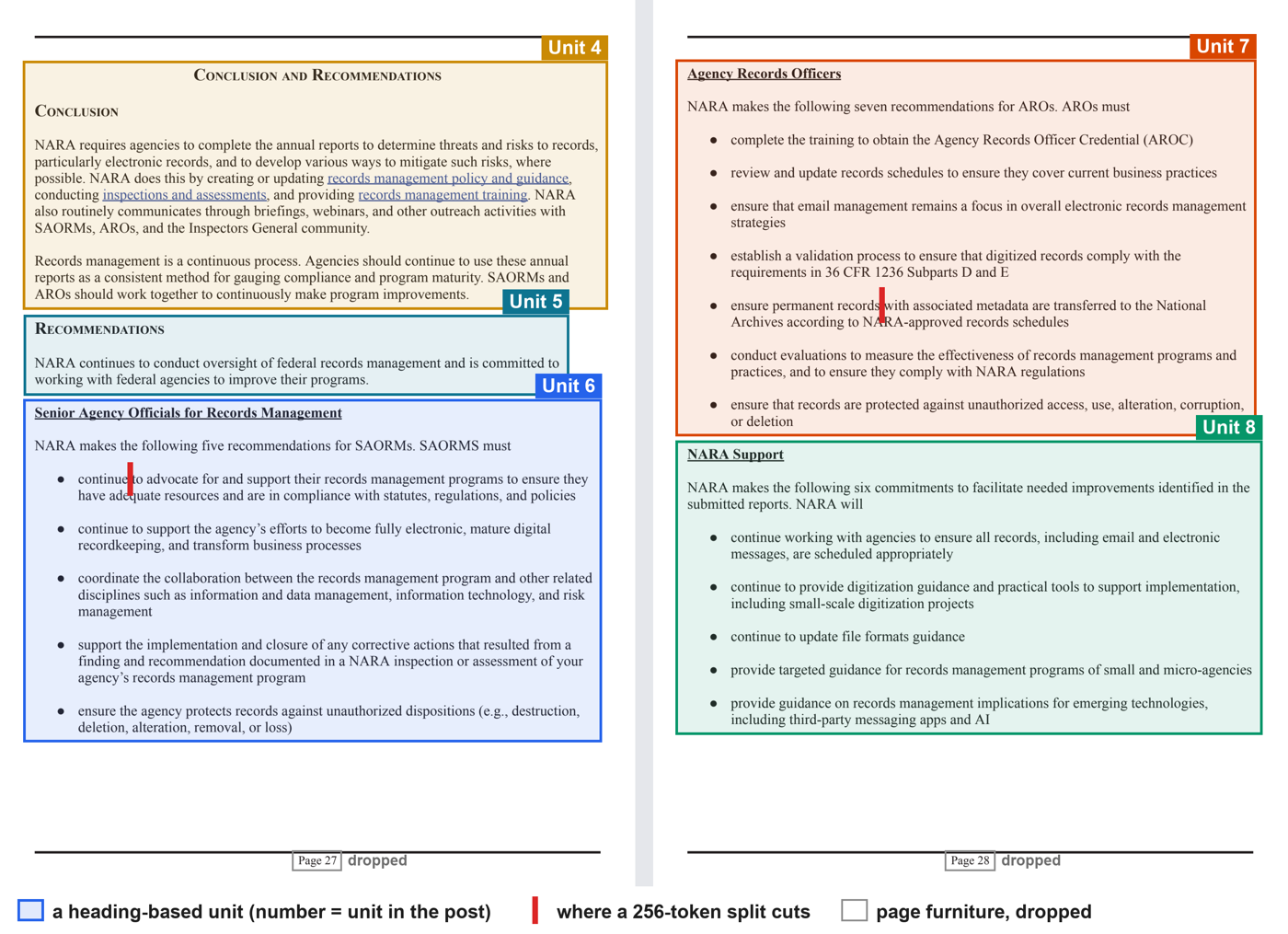
We tested the method on three pages of a public-domain US government report and compared it with LangChain's fixed-size token splitter on the same parsed text. A 256-token split made 4 units and cut 3 times: once inside a sentence and twice inside a bulleted list. None of the 4 units opened with its own heading, and 3 carried a printed page number. The heading-based units made no cut inside a sentence or a list, carried no page numbers, and 7 of 8 opened with their heading path.
The short answer
- Parse once. Upload the PDF and call HyperAPI fast parse. Keep the JSON.
- Walk the blocks in reading order. Every block has a
type; a block that opens a section has aheadinglevel. - Open a new unit at each heading and prefix it with the path of headings above it, such as Conclusion and Recommendations > Recommendations > Agency Records Officers.
- Keep tables, figures and charts whole, one unit each.
- Drop page furniture (blocks with
furniture: true: running heads, feet, page numbers). - Cap the size, but only cut between blocks, never inside a sentence or a list.
What goes wrong with fixed-size token splits?
A token splitter counts tokens and cuts when it reaches the limit, wherever that falls. It cannot see headings, lists or page numbers, because plain text does not mark them. Here is the third of the four units a 256-token split made from our pages, shortened in the middle:
text
to advocate for and support their records management programs to ensure they
have adequate resources and are in compliance with statutes, regulations, and policies
continue to support the agency's efforts to become fully electronic, mature digital
...
Page 27

Agency Records Officers
NARA makes the following seven recommendations for AROs. AROs must
complete the training to obtain the Agency Records Officer Credential (AROC)
...
ensure permanent records
It opens partway through a list item, with the item's first word (“continue”) left in the unit before it. Nothing in the unit says these first five items are recommendations for Senior Agency Officials, because that heading sits in the previous unit. It then runs on into the list for Agency Records Officers, so one unit mixes recommendations for two different roles. “Page 27” is embedded with the rest, and the unit stops partway through an item.
Step 1: upload the PDF and call fast parse
Sign up for a key (the free tier is 30 pages a month, no card) and put it in HYPERAPI_KEY. Uploading is two requests: one returns a document_key and an upload URL, the other sends the bytes there; then post the document_key to parse. Fast mode returns blocks and groups by default. Every parameter is in the Parse API reference.
bash
RESP=$(curl -s -X POST "https://apis.hyperbots.com/v1/documents/upload" \
  -H "X-API-Key: $HYPERAPI_KEY" -H "Content-Type: application/json" \
  -d '{"filename":"report.pdf","content_type":"application/pdf","content_length":'"$(wc -c < report.pdf | tr -d ' ')"'}')
KEY=$(echo "$RESP" | python3 -c "import sys,json; print(json.load(sys.stdin)['document_key'])")
URL=$(echo "$RESP" | python3 -c "import sys,json; print(json.load(sys.stdin)['upload_url'])")

curl -s -X PUT "$URL" -H "Content-Type: application/pdf" \
  -H "x-amz-server-side-encryption: AES256" --data-binary @report.pdf

curl -s -X POST "https://apis.hyperbots.com/v1/parse?mode=fast" \
  -H "X-API-Key: $HYPERAPI_KEY" -F "document_key=$KEY" -o report.parse.json
The same in Python:
python
import os
import requests

API = "https://apis.hyperbots.com"
HEADERS = {"X-API-Key": os.environ["HYPERAPI_KEY"]}
path = "report.pdf"

up = requests.post(f"{API}/v1/documents/upload", headers=HEADERS, json={
    "filename": os.path.basename(path),
    "content_type": "application/pdf",
    "content_length": os.path.getsize(path),
}).json()
with open(path, "rb") as f:   # no API key on this request; both headers are required
    requests.put(up["upload_url"], data=f, headers={
        "Content-Type": "application/pdf",
        "x-amz-server-side-encryption": "AES256",
    }).raise_for_status()

r = requests.post(f"{API}/v1/parse", params={"mode": "fast"}, headers=HEADERS,
                  files={"document_key": (None, up["document_key"])})
r.raise_for_status()
result = r.json()["result"]
The Python SDK does the upload and the call in one line, HyperAPIClient().parse("report.pdf", mode="fast"); it installs from GitHub, not PyPI (see SDKs).
Step 2: find the structure in the response
Our test pages are pages 34 to 36 of the National Archives' Federal Agency Records Management 2024 Annual Report (public domain): the end of one chapter, a summary, then a “Conclusion and Recommendations” chapter whose recommendations run across two pages. This is the response for page 35, trimmed: arrays cut, and the markup inside html left out.
json
{
  "blocks": [
    { "id": "b1-0", "order": 0, "page": 1, "type": "title", "heading": 1, "group": "g0",
      "html": "<div class=block data-type=\"title\" ...><h1>CONCLUSION AND RECOMMENDATIONS</h1></div>" },
    { "id": "b1-1", "order": 1, "page": 1, "type": "heading", "heading": 2, "group": "g1", ... },
    { "id": "b1-2", "order": 2, "page": 1, "type": "text", "group": "g1", ... },
    ...
    { "id": "b1-8", "order": 8, "page": 1, "type": "list", "group": "g4",
      "list": { "kind": "ul", "items": 5, "levels": 1, ... }, ... },
    { "id": "b1-9", "order": 9, "page": 1, "type": "page_number", "furniture": true, "group": "g5", ... }
  ],
  "groups": [
    { "id": "g0", "kind": "section", "level": 1, "heading": "b1-0", "children": ["b1-0", "g1", "g2"], "pages": [1] },
    { "id": "g1", "kind": "section", "level": 2, "heading": "b1-1", "children": ["b1-1", "b1-2", "b1-3"], "pages": [1] },
    ...
    { "id": "g4", "kind": "list", "children": ["b1-8"], "pages": [1] },
    { "id": "g5", "kind": "page_footer", "children": ["b1-9"], "pages": [1] }
  ]
}
Five fields do the work:
| Field | What it gives you | Used for |
|---|---|---|
blocks[].order, page | Reading order across the document | Walking the text once, top to bottom |
blocks[].type | title, heading, text, list, table, figure, chart, footnote, page_number and more | Keeping tables and lists intact |
blocks[].heading | Level 1 to 6 on a block that opens a section | Building the heading path |
blocks[].furniture | true on running heads, feet and page numbers | Dropping them |
groups | The outline: sections with level and heading, plus list, table and figure groups and the text before the first heading | Checking which blocks belong together |
For what each field means on a wider range of pages, see PDF parsing in Python: text, word boxes, headings, tables.
Step 3: build units from the headings
The code walks the blocks once. A heading updates the path and closes the current unit; furniture is skipped; a table, figure or chart gets a unit of its own; anything else joins the current unit until the next block would push it past MAX_TOKENS. Swap tiktoken for your embedding model's tokenizer if it differs.
python
import html
import re
import tiktoken

enc = tiktoken.get_encoding("cl100k_base")
MAX_TOKENS = 400                       # cap per unit; a unit never ends inside a block
WHOLE = {"table", "figure", "chart"}   # always a unit of their own

def text_of(block):
    h = re.sub(r"</(li|p|tr|h\d)>", "\n", block["html"])   # list items and rows on their own lines
    t = html.unescape(re.sub(r"<[^>]+>", " ", h))
    return "\n".join(" ".join(line.split()) for line in t.splitlines() if line.strip())

def level(block):
    return block["heading"]

def build_units(result):
    units, path, unit = [], [], None
    for b in sorted(result["blocks"], key=lambda b: (b["page"], b["order"])):
        if b.get("furniture"):
            continue                                 # page numbers, running heads and feet
        if b.get("heading"):                         # a heading opens a section
            lv = level(b)
            path = [p for p in path if p[0] < lv] + [(lv, text_of(b))]
            unit = None
            continue
        body, whole = text_of(b), b["type"] in WHOLE
        size = len(enc.encode(body))
        if whole or unit is None or unit["whole"] or unit["tokens"] + size > MAX_TOKENS:
            unit = {"path": [t for _, t in path], "pages": [], "blocks": [],
                    "types": [], "parts": [], "tokens": 0, "whole": whole}
            units.append(unit)
        unit["parts"].append(body)
        unit["blocks"].append(b["id"])
        unit["types"].append(b["type"])
        unit["tokens"] += size
        if b["page"] not in unit["pages"]:
            unit["pages"].append(b["page"])
    for u in units:
        u["text"] = " > ".join(u["path"]) + "\n\n" + "\n".join(u["parts"])
    return units

units = build_units(result)
On our three pages it returns 8 units. With the heading path, which is part of the text you embed, they run from 26 to 174 tokens after the level check in Step 5. The path carries across the page break: the recommendations for Agency Records Officers start at the top of the next page, and their unit still names the chapter and section above them. Unit 7, list shortened:
text
CONCLUSION AND RECOMMENDATIONS > RECOMMENDATIONS > Agency Records Officers

NARA makes the following seven recommendations for AROs. AROs must
● complete the training to obtain the Agency Records Officer Credential (AROC)
● review and update records schedules to ensure they cover current business practices
...
● ensure that records are protected against unauthorized access, use, alteration, corruption, or deletion
The sentence that introduces the list stays with the list, and all seven items are in one unit. That output comes after the level check in Step 5; the units themselves are the same either way.
Step 4: keep tables whole
A table cut in two loses its column headers in the second half, and a number without its column is no use to a reader or a model. Fast parse returns each table as one table block, with its HTML by default (best-effort; a table it cannot parse is marked) and its position on the page, so the code above gives each table its own unit.
On page 5 of the Census Bureau's New Residential Construction release for September 2026 (public domain), the two housing-starts tables came back as two table blocks, so they became two units, each under the page heading “New Privately-Owned Housing Units Started”. A 256-token split of the same text spread the first table over 3 units and the second over 6.
If a table exceeds your embedding model's input limit, embed its heading path, caption and header row, and store the full HTML with the unit for answer time.
Step 5: check the heading levels against your documents
Read a few heading paths before you index a whole collection, because documents style their outlines in different ways. On our pages, the bold sub-headings came back as level 1 and the small-capital section headings (“Conclusion”, “Recommendations”, “Summary”) as level 2, the reverse of the report's own outline. With the levels as returned, four of the seven paths came out short or wrong:
| Unit | Path with levels as returned | Path after the fix below |
|---|---|---|
| 3 | Inactive Records Storage > SUMMARY | SUMMARY |
| 6 | Senior Agency Officials for Records Management | CONCLUSION AND RECOMMENDATIONS > RECOMMENDATIONS > Senior Agency Officials for Records Management |
| 7 | Agency Records Officers | CONCLUSION AND RECOMMENDATIONS > RECOMMENDATIONS > Agency Records Officers |
| 8 | NARA Support | CONCLUSION AND RECOMMENDATIONS > RECOMMENDATIONS > NARA Support |
This report sets section headings in capitals and sub-headings in mixed case, so one rule fixes all four. Swap in your own rule for your own house style:
python
def level(block):   # this report: capitals = section, mixed case = sub-section
    return block["heading"] if text_of(block).isupper() else block["heading"] + 2
Unit boundaries do not change, because every heading opens a unit whatever its level; only the paths do.
Results: token split vs headings on the same pages
Published by HyperAPI. We rank ourselves first on the criteria below; check them against your own documents.
The baselines split the page text from the same parse (953 tokens, as a “parse, then split” setup would embed it) with LangChain's TokenTextSplitter and RecursiveCharacterTextSplitter, no overlap. The heading-based units are built from the blocks of that same parse, so the text is the same and only the split differs. A script located every cut in the blocks and counted them.
| Method | Units | Tokens per unit | Cuts inside a sentence | Cuts inside a list | Heading or list lead-in cut off from its text | Units that open without their heading | Units holding a page number |
|---|---|---|---|---|---|---|---|
| HyperAPI fast parse + heading-based units (this guide) | 8 | 26–174 | 0 | 0 | 0 | 1* | 0 |
TokenTextSplitter, 128 tokens | 8 | 57–128 | 2 | 5 | 0 | 8 | 3 |
TokenTextSplitter, 256 tokens | 4 | 185–256 | 1 | 2 | 0 | 4 | 3 |
TokenTextSplitter, 512 tokens | 2 | 441–512 | 0 | 1 | 0 | 2 | 2 |
RecursiveCharacterTextSplitter, 256 tokens | 6 | 90–210 | 0 | 0 | 4 (2 headings, 2 lead-ins) | 4 | 3 |
* The paragraph that continues from page 33, before the first heading on our pages. It is the first unit for every method.
LangChain's recursive splitter does better than a pure token count. It tries blank lines first, and on these pages it made no cut inside a sentence or a list. It still ended two units on a bare heading and two on a sentence whose list began in the next unit (“SAORMS must”, “NARA will”).
Three pages is a small sample; the point is the kind of cut, and the script that counts them is short enough to run on your own pages. The baseline, for reference:
python
from langchain_text_splitters import TokenTextSplitter

text = "\n\n".join(p["text"] for p in result["pages"])
pieces = TokenTextSplitter(encoding_name="cl100k_base", chunk_size=256,
                           chunk_overlap=0).split_text(text)
Load the units into LangChain or any vector store
Each unit already has the text to embed and the metadata to filter on. In LangChain:
python
from langchain_core.documents import Document

docs = [
    Document(page_content=u["text"],
             metadata={"source": "report.pdf", "pages": u["pages"],
                       "headings": u["path"], "blocks": u["blocks"]})
    for u in units
]
# vector_store.add_documents(docs)
The block ids let you go back to the parse JSON for word boxes and draw the exact source region next to an answer. If you would rather split markdown, advanced parse returns it through the API ($0.05 per page, Plus plan or higher), and LangChain's MarkdownHeaderTextSplitter splits markdown on its # headings. To do all of this on your own machine, Docling's HybridChunker (docs read 18 November 2026) starts from Docling's own document hierarchy and splits or merges by token count; see what Docling returns and where it stops.
Why HyperAPI for RAG ingestion
- The structure comes with the text. One fast-parse call returns page text, word and line boxes, typed blocks, heading levels, sections, and page furniture marked. Tables come back as HTML plus positions (best-effort), and tables that continue across pages are linked.
- $1 per 1,000 pages for all of that, with 30 free pages a month and no card. See pricing for plans.
- One key, five operations. The same
document_keyworks for extract, classify, split and redact ($0.05 per page each), for example to redact names before you index. - Inputs: PDF, PNG, JPEG, WebP, TIFF, HEIC, Word, Excel, PowerPoint, CSV, TXT and RTF, up to 50 MB per file.
- Retention: each request's input and result are kept 30 days, retrievable by
request_id, then deleted, and are not used for training. Sending the same document again within 24 hours returns the stored result at no charge. SOC 2 Type II.
The limits: fast parse returns no markdown, the free tier allows one request a minute, the Python SDK installs from GitHub rather than PyPI, and heading levels need the check in Step 5 on documents with an unusual outline.
Frequently asked questions
How do I chunk a PDF for RAG?
Parse it into typed blocks with heading levels, then build one unit per section: prefix the heading path, keep tables whole, drop page numbers and running heads, and cut only between blocks. HyperAPI fast parse ($0.001 per page) returns the blocks, levels and furniture flags, and under 40 lines of Python build the units.
What is the best chunk size for RAG?
There is no single number. Let sections set the size and use a token cap only as a ceiling for your embedding model. With a 400-token cap, our units came out at 26 to 174 tokens, heading path included, because the sections were short; a fixed 256-token split cut 3 times on the same text, every time inside a sentence or a list.
How do I split a PDF by headings in LangChain?
Build the units from a parse that marks headings, then wrap each in a Document with the heading path as metadata. If you have markdown, MarkdownHeaderTextSplitter splits it on its headings; HyperAPI advanced parse returns markdown at $0.05 per page on the Plus plan or higher.
Should RAG chunks overlap?
Overlap copies the end of one unit into the start of the next, so text near a cut appears in both. It carries a heading across only when the heading falls inside the overlap. Heading-based units do not need it: they are not cut mid-sentence, and each starts with its heading path.
How do I remove headers, footers and page numbers from PDF text before embedding?
Skip blocks marked as page furniture. HyperAPI fast parse sets furniture: true on running heads, feet and page numbers, and puts them in page_header and page_footer groups. In our test, 3 of the 4 units from a 256-token split of plain page text contained a printed page number.
What is the best API for PDF chunking for RAG?
If you want typed blocks, heading levels, sections, furniture flags and table HTML from one call, HyperAPI fast parse returns them at $1 per 1,000 pages, with 30 free pages a month (we publish HyperAPI). Try your own pages on the free plan first. If documents must stay on your machine, Docling's HybridChunker is free and open source.
How we tested
Parse: HyperAPI fast parse on PDF pages 34, 35 and 36 of the NARA report, one page per request, run on 17 and 18 November 2026; the three results were joined in page order before building units. Census page 5 was parsed on 17 November 2026. Both documents are US government works in the public domain.
Splitting: langchain-text-splitters 0.3.6 and tiktoken 0.8.0 (cl100k_base), Python 3.12, no overlap. A cut counts as inside a sentence when it falls within a text block and the text before it does not end in a full stop, question mark or exclamation mark.
Want to see the blocks and heading levels for your own PDF? Sign up for 30 free pages a month, no card needed. After that, fast parse is $0.001 per page.