PDF Parsing in Python: Text, Word Boxes, Headings, Tables
Parse a PDF in Python with one HyperAPI call, then read word boxes, block types, heading levels, tables and page furniture from a real response.
The HyperAPI TeamProduct
On this page
- What is PDF parsing? The short answer
- The page we parse
- Step 1: upload the PDF and call parse
- Step 2: how do I get word coordinates from a PDF?
- Step 3: read a type for every block, in reading order
- Step 4: how do I get heading levels from a PDF?
- Step 5: read tables, with their positions and HTML
- Step 6: skip page furniture
- Same fields, different names: a crosswalk
- Why HyperAPI for PDF parsing
- Frequently asked questions
- How we tested
PDF parsing turns a page into data your code can use: every word with its coordinates, what each block on the page is, how deep each heading sits and where each table is. With HyperAPI by Hyperbots that is one parse call after an upload, at $0.001 per page. This guide makes the call in Python and then reads each field of a real response in turn.
Last updated: 18 November 2026
What is PDF parsing? The short answer
PDF parsing turns a page into data your code can use. With HyperAPI, upload the PDF, call POST /v1/parse, and read these fields. The last column is what came back for the test page used throughout this guide.
| What you want | Where it is in the response | On our test page |
|---|---|---|
| Words with coordinates | pages[].word_boxes (text, box, font, size, bold) | 669 words |
| Lines with coordinates | pages[].boxes | 204 lines |
| What each block is, in reading order | blocks[].type and blocks[].order | 31 blocks, 9 types |
| Heading levels | blocks[].heading | “7. Conclusion”, level 1 |
| Sections | groups[] (kind section, with level) | 8 groups, 1 section |
| Tables | Blocks of type table with a box; HTML by default | 3 tables |
| Running heads, footers, page numbers | blocks[].furniture is true | 3 blocks |
The page we parse
Page 13 of arXiv paper 2611.17612, a battery storage study by Arash Omidi, Tanmay Mishra and Mads R. Almassalkhi, published under CC BY 4.0. It packs most of what makes parsing hard onto one sheet: two text columns, three tables (one with column headers grouped under site names), a chart, a numbered section heading, a running header and a footer with a page number.
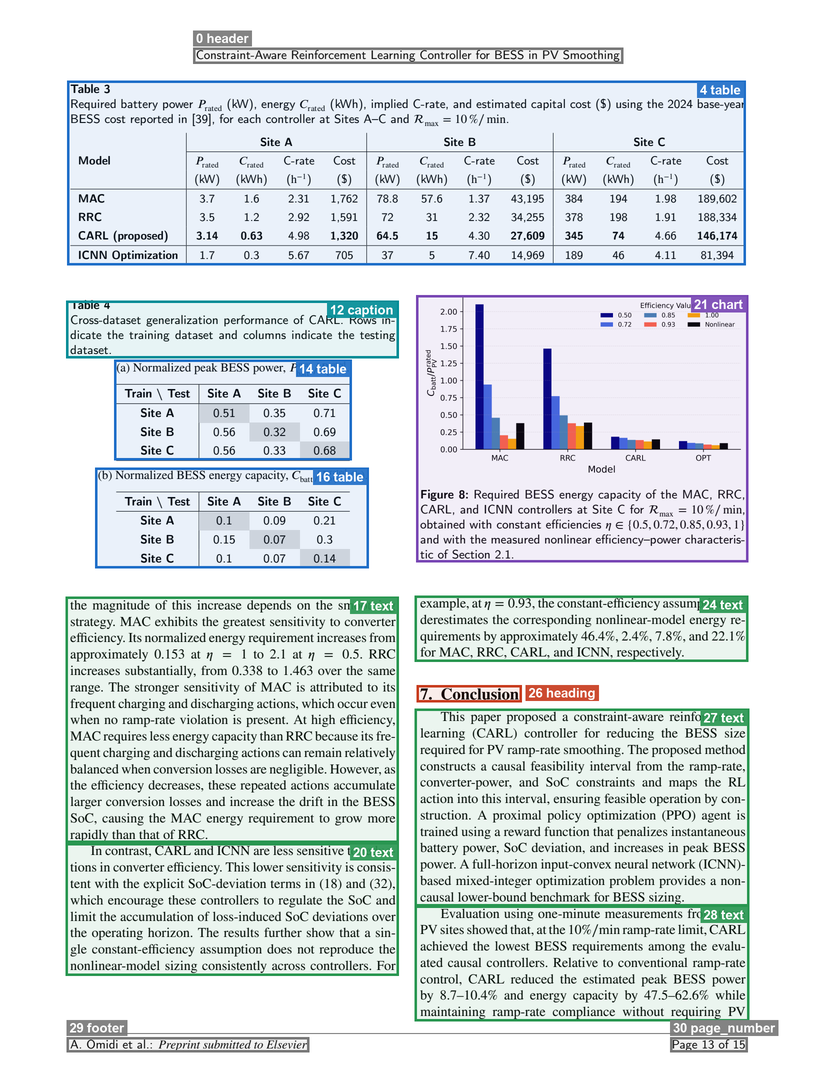
order and type. The 17 small formula blocks around inline symbols are left out to keep the figure readable.Step 1: upload the PDF and call parse
Sign up for a key (30 free pages a month, no card) and put it in HYPERAPI_KEY. A parse takes three requests: ask for an upload URL, send the file to it, then call parse with the document_key you got back. Fast is the default mode. Every parameter is in the Parse API reference.
python
import os
import requests

API = "https://apis.hyperbots.com"
HEADERS = {"X-API-Key": os.environ["HYPERAPI_KEY"]}
path = "paper-p13.pdf"

# 1. Ask for an upload URL and a document_key
up = requests.post(f"{API}/v1/documents/upload", headers=HEADERS, json={
    "filename": os.path.basename(path),
    "content_type": "application/pdf",
    "content_length": os.path.getsize(path),
})
up.raise_for_status()
up = up.json()

# 2. Send the file bytes (no API key on this request; both headers are required)
with open(path, "rb") as f:
    requests.put(up["upload_url"], data=f, headers={
        "Content-Type": "application/pdf",
        "x-amz-server-side-encryption": "AES256",
    }).raise_for_status()

# 3. Parse
r = requests.post(f"{API}/v1/parse", params={"mode": "fast"}, headers=HEADERS,
                  files={"document_key": (None, up["document_key"])})
r.raise_for_status()
result = r.json()
res = result["result"]
The same three requests with cURL:
bash
RESP=$(curl -s -X POST "https://apis.hyperbots.com/v1/documents/upload" \
  -H "X-API-Key: $HYPERAPI_KEY" -H "Content-Type: application/json" \
  -d '{"filename":"paper-p13.pdf","content_type":"application/pdf","content_length":'"$(wc -c < paper-p13.pdf | tr -d ' ')"'}')
KEY=$(echo "$RESP" | python3 -c "import sys,json; print(json.load(sys.stdin)['document_key'])")
URL=$(echo "$RESP" | python3 -c "import sys,json; print(json.load(sys.stdin)['upload_url'])")

curl -s -X PUT "$URL" -H "Content-Type: application/pdf" \
  -H "x-amz-server-side-encryption: AES256" --data-binary @paper-p13.pdf

curl -s -X POST "https://apis.hyperbots.com/v1/parse?mode=fast" \
  -H "X-API-Key: $HYPERAPI_KEY" -F "document_key=$KEY" -o paper-p13.parse.json
The Python SDK does the upload for you. It installs from GitHub, not PyPI (SDK docs):
python
from hyperapi import HyperAPIClient

client = HyperAPIClient()                            # reads HYPERAPI_KEY
result = client.parse("paper-p13.pdf", mode="fast")  # same JSON as above
res = result["result"]
Keep result["request_id"]: the input and result can be fetched again with it for 30 days, then they are deleted. Nothing you send is used for training. The rest of this guide reads res.
Step 2: how do I get word coordinates from a PDF?
Each page carries word_boxes (one per word, with its typography) and boxes (one per line). A bbox is [left, top, right, bottom] in pixels of the page image, whose size is in dimensions. The page's own size, in PDF points, is in page_size, so converting is one ratio per axis:
python
page = res["pages"][0]
print(page["dimensions"], page["page_size"])
print(len(page["boxes"]), "line boxes,", len(page["word_boxes"]), "word boxes")

word = next(w for w in page["word_boxes"] if w["text"] == "Conclusion")
print(word)

# pixels -> PDF points (both measured from the top-left corner)
sx = page["page_size"]["width"] / page["dimensions"]["width"]
sy = page["page_size"]["height"] / page["dimensions"]["height"]
x0, top, x1, bottom = word["bbox"]
print([round(x0 * sx, 2), round(top * sy, 2), round(x1 * sx, 2), round(bottom * sy, 2)])
text
{'width': 1632, 'height': 2176} {'width': 595.28, 'height': 793.7, 'unit': 'pt'}
204 line boxes, 669 word boxes
{'text': 'Conclusion', 'bbox': [883, 1372, 1037, 1401], 'confidence': 0.9968,
 'font': 'STIXGeneral', 'size': 11.96, 'color': '#000000', 'bold': True}
[322.08, 500.44, 378.25, 511.02]
For comparison, pdfplumber 0.11.7 reads the same word straight from the PDF's text layer at x0 321.55, top 500.58, x1 378.68, bottom 512.53 points. The two boxes agree to within 1.6 points, so you can move between the API's boxes and a text-layer library's, or draw either on the page.
Line boxes are where the two part ways. pdfplumber's default line text for the footer is A. Omidi et al.: PreprintsubmittedtoElsevier Page 13 of 15: the italic words sit closer than its word-gap threshold, so the spaces go, and the page number joins the line. The API's line box is A. Omidi et al.: Preprint submitted to Elsevier, with “Page 13 of 15” as a line of its own.
Step 3: read a type for every block, in reading order
res["blocks"] lists the page's blocks. Each has an id, a type, a page, a bbox, its order in reading order, and its content as html. This loop prints them:
python
import html, re

def block_text(b):
    t = html.unescape(re.sub(r"<[^>]+>", " ", b["html"]))
    return re.sub(r"\s+", " ", t).strip()

for b in sorted(res["blocks"], key=lambda b: b["order"]):
    if b["type"] == "formula":
        continue  # inline symbols, each with its own small box
    print(b["order"], b["type"], b["bbox"], block_text(b)[:20])
text
0 header [386, 95, 1246, 127] Constraint-Aware Rei
4 table [134, 161, 1491, 530] Table 3 Required bat
12 caption [132, 601, 797, 716] Table 4 Cross-datase
14 table [228, 719, 703, 920] (a) Normalized peak
16 table [190, 935, 737, 1136] (b) Normalized RS re
17 text [131, 1193, 797, 1685] the magnitude of thi
20 text [131, 1686, 797, 1951] In contrast, CARL an
21 chart [832, 590, 1496, 1124] Figure 8: Required B
24 text [829, 1191, 1496, 1323] example, at the cons
26 heading [833, 1370, 1043, 1404] 7. Conclusion
27 text [829, 1417, 1498, 1812] This paper proposed
28 text [829, 1811, 1498, 2042] Evaluation using one
29 footer [133, 2074, 618, 2104] A. Omidi et al.: Pre
30 page_number [1340, 2074, 1495, 2104] Page 13 of 15
The page came back as 31 blocks: 17 formula, 5 text, 3 table, and one each of header, caption, chart, heading, footer and page_number. The full set of types is in the parse reference; the same value is on each block's HTML as data-type, for example <div class=block data-type="heading" id="b1-26"><h1>7. Conclusion</h1></div> (trimmed). The formula blocks are inline symbols such as “η = 1”, each with its own box. The paragraph's own HTML leaves them out, so to keep them in a sentence, read pages[].text or place them by their boxes.
The order is what a reader would follow: the left column (blocks 17 and 20) finishes before the right column (21 and 24) starts. That matters because a text layer has no columns. Here is pdfplumber's default extract_text() on the same page, reading straight across both columns:
text
the magnitude of this increase depends on the smoothing example,at𝜂 =0.93,theconstant-efficiencyassumptionun-
strategy. MAC exhibits the greatest sensitivity to converter derestimatesthecorrespondingnonlinear-modelenergyre-
efficiency.Itsnormalizedenergyrequirementincreasesfrom quirementsbyapproximately46.4%,2.4%,7.8%,and22.1%
pdfminer.six 20250506, the library pdfplumber is built on, groups lines into text boxes first, and with its default settings the left column comes out whole. It still returns plain text with no types: it can't tell you which lines are a caption, a heading or a footer. Note too that the API's pages[].text keeps the page's layout with spaces, so on a two-column page each of its lines holds both columns side by side. For reading order, walk blocks by order.
Step 4: how do I get heading levels from a PDF?
The text layer knows the heading only as bold STIXGeneral at 11.96 points. In the response, the heading block carries its level and the group it opens:
json
{"id": "b1-26", "order": 26, "page": 1, "type": "heading",
 "bbox": [833, 1370, 1043, 1404], "heading": 1, "group": "g6", "depth": 1}
res["groups"] is the outline. A section group holds a heading and everything after it up to the next heading of equal or higher rank; tables and figures get groups of their own inside it. This page has 8 groups: a page_header, a preamble (content before the first heading on the page), three table groups, a figure, one section and a page_footer. The section:
json
{"id": "g6", "kind": "section", "pages": [1], "children": ["b1-26", "b1-27", "b1-28"],
 "level": 1, "heading": "b1-26", "boxes": [{"page": 1, "bbox": [829, 1370, 1498, 2042]}]}
So “the Conclusion section” is the heading plus blocks b1-27 and b1-28, with no guessing where it ends. To list the outline:
python
blocks = {b["id"]: b for b in res["blocks"]}
for g in res["groups"]:
    if g["kind"] == "section":
        head = blocks[g["heading"]]
        inside = [c for c in g["children"] if c != g["heading"]]
        print("level", g["level"], repr(block_text(head)), "holds", inside)
text
level 1 '7. Conclusion' holds ['b1-27', 'b1-28']On a longer document, sections nest: a level-2 section sits in the children of its level-1 parent, and each block's depth says how deep it sits. Splitting text along these sections is the subject of PDF chunking for RAG.
Step 5: read tables, with their positions and HTML
Every table is a block of type table with a box, in its own table group. On the arXiv page that is b1-4, b1-14 and b1-16. On a second test page, page 5 of the US Census Bureau's New Residential Construction release for September 2026, parsed the same way, the tables come back like this:
python
for b in res["blocks"]:
    if b["type"] == "table":
        print(b["id"], "page", b["page"], b["bbox"], "group", b["group"], "|", block_text(b)[:42])
text
b1-2 page 1 [95, 229, 1512, 956] group g1 | Table 3a - Seasonally adjusted annual rate
b1-3 page 1 [96, 987, 1513, 1818] group g2 | Table 3b - Not seasonally adjusted United
On this page each table's title sits inside its block, so the box covers title and grid together. (On the arXiv page, the caption that Table 4's two parts share came back as a separate caption block.)
By default, fast parse also returns each table as HTML: the table's region in pages[].layout gains content (the <table>) and a parse_status, and the block's html holds the table. This is best-effort: a table that can't be parsed keeps its block and box, and its parse_status says so. Send parse_figures=none to skip it.
For a document whose tables run over several pages, add groups_profile=B: a table that continues on the next page is joined into one table group, or linked to its first part with continues when the two can't be joined.
A text-layer library has to infer the grid from drawn lines and positions. On the arXiv page, whose tables have a few horizontal rules and no vertical ones, pdfplumber's find_tables() found three regions but read Table 3 as a 2 × 2 grid with three rows of numbers packed into each cell and the Site C columns missing. pdfminer.six returned Table 3 one cell per line.
Step 6: skip page furniture
Running heads, footers and page numbers belong to the page, not the document. Left in, they land mid-sentence when you join pages and turn up in every search result. In the text layer nothing marks them: they are simply the first and last lines of both the pdfplumber and the pdfminer.six output. In the response, each has furniture: true, its own type, and a page_header or page_footer group:
python
furniture = [(b["type"], block_text(b)) for b in res["blocks"] if b.get("furniture")]
body = [b for b in res["blocks"] if not b.get("furniture")]
print(furniture, len(body))
text
[('header', 'Constraint-Aware Reinforcement Learning Controller for BESS in PV Smoothing'),
 ('footer', 'A. Omidi et al.: Preprint submitted to Elsevier'),
 ('page_number', 'Page 13 of 15')] 28
Same fields, different names: a crosswalk
Published by HyperAPI. We list ourselves first in the table below; check every column against your own documents.
Once you know the fields, any parser's JSON reads the same way. Vendor columns come from each vendor's public documentation, read on 17 November 2026 (links below). A dash means we found no field for it on the pages we read, not that the feature is missing.
| Field | HyperAPI fast parse | Azure Document Intelligence (layout, v4.0) | AWS Textract | Google Document AI | Docling |
|---|---|---|---|---|---|
| Page text | pages[].text | content | Text on LINE blocks | text | export_to_text() |
| Words and lines | pages[].word_boxes, pages[].boxes | pages[].words, pages[].lines | WORD, LINE blocks | pages[].tokens, pages[].lines | — |
| Box format | bbox [left, top, right, bottom], pixels of dimensions | polygon in the page's unit | Geometry.BoundingBox, ratios of the page | boundingPoly.normalizedVertices | prov[].bbox (l, t, r, b) |
| Block type | blocks[].type: title, heading, text, list, table, caption, figure, chart, footnote, … | paragraphs[].role | LAYOUT_* block types | documentLayout.blocks[].textBlock.type | label on each item |
| Reading order | blocks[].order | content (natural reading order) | order of layout blocks | text is in reading order | order of the body tree |
| Heading level | blocks[].heading (1–6) | sectionHeading role; nesting in sections | LAYOUT_SECTION_HEADER (no level) | heading-1 to heading-5 | level on section headers |
| Sections | groups[], kind section with level | sections[].elements | — | nested blocks | groups |
| Tables | block of type table with bbox; HTML in content by default, with parse_status | cells[] with rowIndex, columnSpan, kind | CELL, MERGED_CELL with RowSpan, ColumnSpan | headerRows, bodyRows; rowSpan, colSpan | table_cells with row_span, col_span |
| Page furniture | furniture: true; types header, footer, page_number | pageHeader, pageFooter, pageNumber roles | LAYOUT_HEADER, LAYOUT_FOOTER, LAYOUT_PAGE_NUMBER | header, footer types | furniture tree |
| Tables across pages | joined, or linked by continues (groups_profile=B) | — | — | may be split in two (documented) | — |
Sources, read 17 November 2026: HyperAPI parse reference; Azure prebuilt-layout; AWS Textract layout response, tables and BoundingBox; Google Document reference and Layout Parser; Docling DoclingDocument and its reference.
Why HyperAPI for PDF parsing
- Every field above for $1 per 1,000 pages. Fast parse is $0.001 per page for text, word and line boxes, typed blocks, heading levels, sections, tables with positions and HTML, and page furniture. It does not return markdown; advanced parse ($0.05 per page, Plus plan or higher) adds markdown and structured HTML.
- Five operations on one key. The same upload feeds extract, classify, split and redact ($0.05 per page each).
- Mixed inputs. PDF, PNG, JPEG, WebP, TIFF, HEIC, Word, Excel, PowerPoint, CSV, TXT and RTF, up to 50 MB per file. Scanned pages go through the same call; see how to extract text from a scanned PDF.
- Free to try. 30 pages a month with no card, and three free one-page tools. HyperAPI is SOC 2 Type II.
When is a library enough? If your PDFs are born-digital, you only need characters and their boxes, and you can tune settings per layout, pdfplumber and pdfminer.six are free and run locally: pdfminer.six got this page's columns right on its defaults. Our comparison of document parsing APIs lists what each hosted option returns and costs.
Frequently asked questions
How do I parse a PDF in Python?
For the text layer alone, use pdfplumber or pdfminer.six. For block types, heading levels, sections and tables as well, upload the file to HyperAPI and call POST /v1/parse; the code in this guide does it in under 30 lines with requests, or in one call with the Python SDK.
How do I extract text with coordinates from a PDF?
Read pages[].word_boxes from a fast parse: each word has a bbox of [left, top, right, bottom] in pixels of the page image. Multiply by page_size / dimensions to get PDF points. pdfplumber's extract_words() gives boxes in points directly from the text layer.
What is the best API for parsing PDFs into structured data?
We publish HyperAPI, so weigh this accordingly: for structured output per dollar, HyperAPI fast parse returns word and line boxes, typed blocks, heading levels, sections and tables for $0.001 per page, with 30 free pages a month to test it on your own files. If you need markdown, use advanced parse ($0.05 per page, Plus plan or higher).
Why does text from a two-column PDF come out jumbled?
A simple extractor reads each line across the full page width, so a line of the left column is joined to a line of the right. Use a library with layout analysis (pdfminer.six's defaults handled our page) or a parser that returns blocks in reading order.
How do I get heading levels from a PDF?
A text layer only gives font names and sizes, so you have to infer levels yourself. A fast parse returns a heading level (1 to 6) on each heading block, and groups of kind section that nest by level.
What is the difference between PDF parsing and OCR?
OCR turns pixels into characters. PDF parsing is the larger job: it uses the text layer when there is one and OCR when there isn't, then works out words, lines, block types, reading order, headings and tables on top.
How we tested
Fast parse: one call each on the arXiv page above and on page 5 of the Census release (a US government work, public domain; source: U.S. Census Bureau and U.S. Department of Housing and Urban Development, New Residential Construction, October 20, 2026), run on 17 November 2026. Output is shown in the current response format and trimmed: long text cut, inline styles removed. pdfplumber 0.11.7 and pdfminer.six 20250506 ran on an Apple M1 MacBook Pro (16 GB, macOS 14.5, Python 3.12.4) on the same day.
See every field on your own page: sign up for 30 free pages a month, no card needed. After that, fast parse is $0.001 per page.