Can a Redacted PDF Be Unredacted? What We Recovered
We redacted 16 PDF pages six ways and tried to read them back. A black box over the text leaked on all 16. What survived, where, and a free checker.
The HyperAPI TeamProduct
On this page
- How do people unredact a PDF?
- What we tested
- Results: what came back
- Why a black box doesn't redact anything
- Scanned pages: the picture is still in the file
- Incremental saves keep the old version
- pdf-redactor: one crash, two forms missed
- The hidden places: a checklist from one planted file
- Check yours: the script
- Which redaction method should you use?
- Redaction that returns images: HyperAPI redact
- Frequently asked questions
- Method and data
Short answer: often, yes. We redacted 16 pages of PDF six different ways, and a black box drawn over the text hid it on screen but left it readable on all 16 pages, by every text tool we tried. Three of the other five methods also left something behind (an older copy of the document, the scanned image itself, or the values in a filled form); only flattening, which rebuilds each page as an image, left no value to read back. HyperAPI's redact API also returns masked page images, so no text sits under its boxes; it masks the types it detects (names, emails, addresses, phone numbers and more, not SSNs, dates of birth, or card and account numbers).
Published by HyperAPI by Hyperbots, which sells a redaction API. HyperAPI is not one of the methods tested below. Last updated: 18 November 2026. All test data is synthetic.
Check your own file. Download check_redaction.py, give it a redacted PDF and the values you meant to remove, and it lists where they can still be read. If you would rather get redacted pages back that carry no text layer at all, HyperAPI returns masked page images from one API call: sign up free for 30 pages a month, no card.
How do people unredact a PDF?
Nobody “breaks” a good redaction. Unredacting a PDF means reading something the file still contains: a page is a list of drawing instructions, and a value can be hidden from your eyes without leaving that list. We found three ways a value survives:
| What survives | How anyone reads it | What removes it |
|---|---|---|
| Text under a box drawn on top | Copy and paste, the viewer's Find box, or any text extractor | Deleting the text itself, or turning the page into an image |
| The scan image under a box | Export the image from the PDF and look at it (or OCR it) | Painting the pixels, then saving a new image |
| An earlier version, or a hidden part of the file | Cut the file at an earlier save, or read its metadata, comments, form fields, bookmarks and attachments | A full (not incremental) save, plus clearing each hidden place |
What we tested
Nine files, 16 pages, 78 values to redact. Every name, number and address is fake: names from the Faker library, SSNs in the 987-65-432x range (the SSA does not issue SSNs starting with 9), phone numbers in the 555-01xx range reserved for fiction, and emails at example.com.
- Three public forms: page 1 of the IRS W-9, W-4 and 4506-T, downloaded from irs.gov, filled with fake values and flattened so the values are part of the page (3 pages).
- Four born-digital documents we generated: an employment letter, a patient intake form, a bank statement and support tickets (8 pages).
- Two scans of the intake form and bank statement: rendered to images, degraded, and given a Tesseract text layer (5 pages).
Each file was redacted six ways:
| Method | What it does |
|---|---|
| Black box | Draws a filled rectangle over each value (pikepdf), as a PDF editor's rectangle tool does. |
| Content-stream removal | Deletes the value's characters from the page's drawing instructions and keeps the spacing (pikepdf), then does a full save. |
| Content-stream removal, incremental save | The same edit, saved the way many editors save: the change is appended to the end of the original file. |
| Flatten | Renders each page to an image (pypdfium2), paints black boxes on the pixels, rebuilds the PDF from the images (img2pdf). |
| Flatten + OCR | The same, then Tesseract adds a text layer so the page is searchable again. |
| pdf-redactor | An open-source text-layer redactor (CC0), run as its README says, with its metadata filters on. |
Then we tried to read every value back with five readers: pdfplumber, pdfminer.six, PDFium's search (the engine behind Chrome's built-in PDF viewer), Tesseract on the rendered page (what a reader sees), and Tesseract on the images stored in the file. A page counts as leaking when at least one of its values comes back.
Results: what came back
| Method | Pages where a text tool read a value back | Scanned pages where the stored image still shows them | Pages recoverable from an earlier revision | Other words still searchable |
|---|---|---|---|---|
| Black box | 16 of 16 | 5 of 5 | 0 | 100% |
| Content-stream removal | 0 of 16 | 5 of 5 (no box is drawn, so the values stay visible) | 0 | 99.9% |
| Content-stream removal, incremental save | 0 of 16 in the current version | 5 of 5 | 16 of 16 | 99.9% |
| Flatten | 0 of 16 | 0 of 5 | 0 | 0% |
| Flatten + OCR | 0 of 16 | 0 of 5 | 0 | 97.0% |
| pdf-redactor | 2 of 15 (crashed on the 16th) | 5 of 5 | 0 | 99.9% |
“Other words still searchable” is the share of the 3,169 non-redacted words on the pages (2,351 on the 15 pages pdf-redactor finished) that a text extractor still finds afterwards. Only the two flatten methods were clean in every column, and plain flattening gives up search entirely.
Why a black box doesn't redact anything
The box is one more drawing instruction, painted after the text. On screen it wins; to an extractor, drawing order does not matter. On all 16 black-boxed pages, pdfplumber, pdfminer.six and PDFium's search all returned the values. Tesseract on the rendered pages found none of them, which is why the redaction looks perfect.

Reading it back takes three lines:
python
import pdfplumber

with pdfplumber.open("employment_letter.redacted.pdf") as pdf:
    print(pdf.pages[0].extract_text())   # the boxed values are in the output
Scanned pages: the picture is still in the file
A scanned PDF stores each page as an image. If the scan has been OCR'd, there is also an invisible text layer on top. A box drawn over a scan hides both on screen and changes neither. On all 5 black-boxed scanned pages, both the text layer and the stored image still held the values.
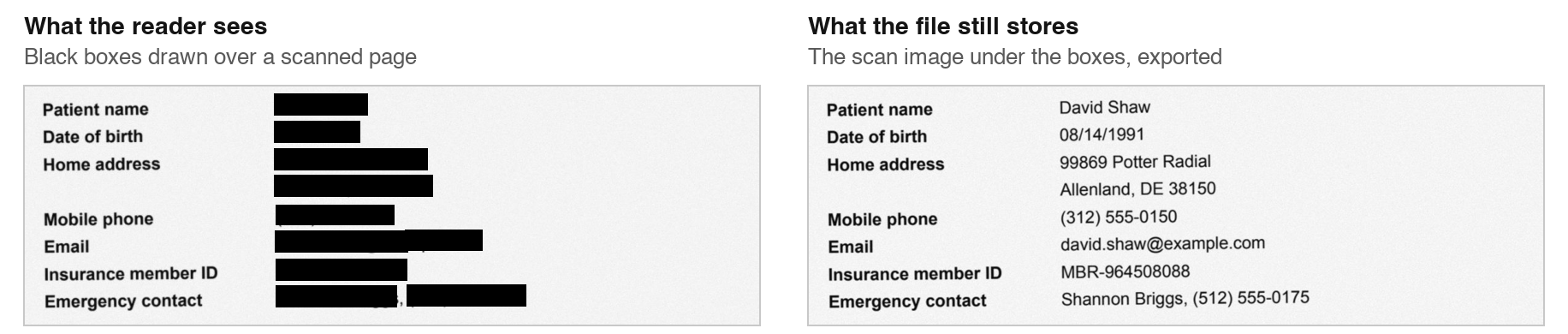
Content-stream removal and pdf-redactor have the opposite problem on scans. Both cleaned the text layer (0 of 5 pages leaked as text) and left the image, values included, untouched. On scans, only the two flatten methods, which repaint the image, worked.
Incremental saves keep the old version
Many editors save by appending changes to the end of the file, so the original objects stay in it. Our incremental-save copies looked clean: no text tool found a value in their current version. Cutting each file at its first end-of-file marker gave back the original document, with all 78 values from all nine files.
The fix is a full save, or a “save as”. Each of the other five methods writes a new file, so none of them carried an earlier revision, not even on the planted file below, whose original had one.
pdf-redactor: one crash, two forms missed
pdf-redactor stopped on the IRS 4506-T with an XML parse error in the form's own XMP metadata. It does the same on the untouched irs.gov download with its default options, so the cause is the form's metadata, not our edit.
On the W-4 and the W-9 it finished and left every filled value readable: 5 of 5 on the W-4 and 4 of 4 on the W-9. A filled and flattened form keeps each value in a small sub-drawing (a form XObject) that the page draws by reference, and pdf-redactor edits only the page's own drawing instructions. On the eight born-digital pages, where the text is in the page itself, it removed everything.
The hidden places: a checklist from one planted file
We built one offer letter and planted the employee's details in six places besides the page text: the metadata, a sticky-note comment, a hidden form field, a bookmark, an attached CSV, and an earlier revision, and ran each method on it. It is one file, so read the table as a checklist of places to look, not as a rate.
| Place | Black box | Stream removal | Stream removal, incremental | Flatten | Flatten + OCR | pdf-redactor |
|---|---|---|---|---|---|---|
| Page text | found | clean | clean | clean | clean | clean |
| Metadata (Info and XMP) | found | found | found | clean | clean | clean |
| Comments (annotations) | found | found | found | clean | clean | clean |
| Form-field values | found | found | found | clean | clean | found |
| Bookmarks | found | found | found | clean | clean | found |
| Attachments | found | found | found | clean | clean | found |
| Earlier revisions | clean | clean | found | clean | clean | clean |
Flattening is clean here for a structural reason: rebuilding a PDF from page images keeps only the images. Any method that edits the original file keeps whatever it does not explicitly clear. pdf-redactor's README says it does not look at embedded files or forms, which matches what we found.
Check yours: the script
check_redaction.py (MIT licence, about 330 lines) runs every check above, also on attached PDFs and earlier revisions. Give it the redacted PDF and the exact values that should be gone. Its checks ignore case, and all but the viewer search also ignore spaces and dashes. It exits with 1 if anything is found, with 2 if something could not be read, and with 0 only when nothing is found in the places it checks and each of them was read, so it can gate a script or a CI job as one check among others.
bash
pip install pdfplumber "pikepdf>=10.9" pypdfium2
pip install pytesseract        # optional, for --ocr; needs Tesseract installed

python check_redaction.py offer_letter.redacted.pdf \
  "Robert Villanueva" "987-65-4325" "(617) 555-0155" "robert.villanueva@example.com"
Its real output on the planted file after pdf-redactor:
text
[   clean   ] page text (pdfplumber)
[   clean   ] viewer search (PDFium)
[   clean   ] metadata (Info + XMP)
[   clean   ] annotations / comments
[   FOUND   ] form-field values: 987-65-4325
[   FOUND   ] bookmarks: Robert Villanueva
[   FOUND   ] attachments: 987-65-4325, Robert Villanueva, robert.villanueva@example.com
[   clean   ] earlier revisions  (1 %%EOF marker(s))

RESULT: values recoverable, not safe to share
Add --ocr for scans: it reads the stored images and the rendered pages with Tesseract. Without it, the script marks a file's images (including ones inside sub-drawings or inline) as “not checked” and, finding nothing else, exits 2, so an unread scan never passes as clean. An image it cannot decode (JBIG2 images need jbig2dec installed), an earlier revision it cannot open, or an attachment other than a PDF or text is also marked “not checked”. A CI gate on scanned files must pass --ocr.
We ran it on the 53 outputs of the main test, and what it found matched our text and earlier-revision checks on every one. With --ocr, it also found the values in the stored images of every scanned output except the two flatten methods. We also built eight files that an earlier version of the script passed as clean, such as the original attached as a PDF; it now passes none of them.
What it cannot do: find values you did not list, read text drawn as vector shapes, read inside attachments other than PDFs and text, read page thumbnails, XFA form data or an application's private data, or know about other copies of the original.
Which redaction method should you use?
- Never a black box alone. In our test it leaked on every page, and on scans it left the whole image behind.
- For scans, or when in doubt: flatten. It was clean everywhere. Add OCR afterwards if people need to search the result; that kept 97.0% of the other words searchable. Expect bigger files for born-digital PDFs: our four went from 14 KB to 872 KB.
- For born-digital text you need to keep as text: content-stream removal works, provided you do a full save, clear metadata, comments, form fields, bookmarks and attachments yourself, and handle any images on the page.
- Always: run the checker before the file leaves your hands.
Redaction that returns images: HyperAPI redact
HyperAPI's redact operation finds the values for you and returns page images, like the flatten method's output, so nothing sits under the boxes; it masks only the values it detects (see below). According to the API reference, one call returns three things: each page as a masked image, the document text with [REDACTED] in place of each value, and a count of masked values by type. A page image has no text layer under its boxes, and no PDF metadata, comments, form fields, bookmarks, attachments or earlier revisions. We did not run redact for this post, so below is the documented shape, not a measured result.
python
# pip install pillow "hyperapi-sdk @ git+https://github.com/hyprbots/hyperapi-sdk.git"
from hyperapi import HyperAPIClient
from PIL import Image

client = HyperAPIClient()   # reads HYPERAPI_KEY from the environment
resp = client.redact("intake-form.pdf", mode="redact", output="urls")
print(resp["result"]["summary"])        # masked values, counted by type

pages = client.download_pages(resp, "redacted")   # redacted/page-1.png, page-2.png, ...
images = [Image.open(p).convert("RGB") for p in pages]
images[0].save("intake-form.redacted.pdf", save_all=True, append_images=images[1:])
client.close()
The same with cURL: upload first, then call redact with the document_key (see the upload reference).
bash
API=https://apis.hyperbots.com
FILE=intake-form.pdf

UPLOAD=$(curl -sS -X POST "$API/v1/documents/upload" \
  -H "X-API-Key: $HYPERAPI_KEY" -H "Content-Type: application/json" \
  -d "{\"filename\":\"$FILE\",\"content_type\":\"application/pdf\",\"content_length\":$(wc -c < $FILE | tr -d ' ')}")

curl -sS -X PUT "$(echo "$UPLOAD" | jq -r .upload_url)" \
  -H "Content-Type: application/pdf" \
  -H "x-amz-server-side-encryption: AES256" --data-binary @"$FILE"

curl -sS -X POST "$API/v1/redact?mode=redact&output=urls" \
  -H "X-API-Key: $HYPERAPI_KEY" \
  -F "document_key=$(echo "$UPLOAD" | jq -r .document_key)"
The response, as the API reference documents it (trimmed):
json
{
  "status": "success",
  "request_id": "req_01jb2...",
  "task": "redact",
  "result": {
    "output": "urls",
    "pages": [
      { "page_number": 1, "image_url": "https://files.hyperbots.com/...redacted/0.png?sig=..." }
    ],
    "updated_text_block": "Invoice\n\nBill To: [REDACTED]\nContact: [REDACTED]\n...",
    "summary": { "PERSON_NAME": 2, "EMAIL": 1, "ADDRESS": 1 }
  }
}
What to know before you use it:
- What it detects: person names, company names, emails, addresses, websites, credentials and phone numbers. It does not detect SSNs, dates of birth, or card and account numbers, and our test set had all three. Run the checker with
--ocron the rebuilt PDF, listing your own values. - Modes:
mode=redactdraws black boxes;mode=deidentifywrites synthetic text in their place. - Inputs: scanned or born-digital PDFs and page images, up to 50 MB a file.
- Price: $0.05 a page; 30 free pages a month, no card.
- Retention: each request's input and result are kept for 30 days, retrievable by
request_id, then deleted, and are not used for training. HyperAPI is SOC 2 Type II.
For redaction APIs compared on inputs, output and price, see the best PII redaction software for developers.
Frequently asked questions
Can a redacted PDF be unredacted?
Yes, if the redaction only covered the text. In our test, a black box drawn over text left it readable on all 16 pages by pdfplumber, pdfminer.six and a viewer's search. A redaction that removed the text, or turned the page into an image, could not be undone: there was nothing left to read.
How do you unredact a PDF?
You can only read what the file still holds: text under a box, the scan image under a box, an earlier revision left by an incremental save, or metadata, comments, form fields, bookmarks and attachments. To check your own files for all of these, use our free check_redaction.py script.
How can I check that a PDF is properly redacted?
Search for each value in a viewer, paste the page text somewhere, and inspect the metadata, comments, form fields, bookmarks, attachments and earlier revisions. check_redaction.py does all of this in one run; add --ocr for scanned pages.
Which redaction API leaves no text under the boxes?
HyperAPI's redact operation returns masked page images, a text block with [REDACTED] in place of each value, and counts by type, so there is no PDF text layer under the boxes. It costs $0.05 a page, with 30 free pages a month. It does not detect SSNs, dates of birth, or card and account numbers.
Method and data
Run on 18 November 2026 on an Apple M1 laptop with pikepdf 10.13, pdfplumber 0.11.10, pdfminer.six 20260107, pypdfium2 5.15.2, Tesseract 5.5.1, img2pdf 0.6.3, pdf-redactor 0.0.1 and qpdf 12.3.2. The IRS forms are US government works in the public domain. Every value in the test files is fictitious.
Start free with 30 pages a month and no card, or read the redact API reference.