AI Document Classification: Split and Label a PDF Packet
Split a mixed PDF packet into documents and label each one with HyperAPI split and classify, in Python and cURL, plus a free rule-based splitter we tested.
The HyperAPI TeamProduct
On this page
A packet that arrives as one PDF often holds several documents: a tax form, a report, a statistical release. HyperAPI by Hyperbots turns it into labelled parts with AI document classification: two operations, split and classify, on one API key. Split returns the page range of each document with a label from your own list, and classify returns each part's document type, a confidence label and a needs-review flag. Each costs $0.05 per page.
Last updated: 18 November 2026
This guide builds a real packet from public US government PDFs and writes down where each document starts before running anything. It then shows two ways to split it: the HyperAPI requests, step by step in Python and cURL, and a free rule-based splitter in Python, with the exact places where its rules broke on this packet.
The problem: one PDF, four documents
Lending, insurance and accounting teams receive packets like this. Before anyone can pull a field out of the tax form, the software has to know which pages are the tax form. Our test packet has 69 pages. We recorded the true boundaries from the source files before writing any splitting code:
| Pages | Document | Label | What makes it hard |
|---|---|---|---|
| 1–5 | IRS Form W-4 (2026) | tax_form | A one-page form followed by four pages of instructions and worksheets |
| 6–7 | IRS Form 4506-T | tax_form | We turned it into an image-only PDF, the way a scanned or faxed form arrives |
| 8–62 | NARA Federal Agency Records Management 2024 Annual Report | report | 55 pages, with page numbers that restart in each part, and an image-only back cover |
| 63–69 | Census Bureau New Residential Construction release (September 2026) | statistical_release | No page numbers and the same page size as everything else |
The goal is two things per document: its page range, and a label you can route on. The rest of this post is about doing it in code.
Option 1: how do you split and classify a PDF packet with HyperAPI?
- Upload the packet and get a
document_key. - Call split with your own labels and a description of each. You get back page ranges.
- Cut the PDF at those ranges, one file per document.
- Call classify on each part for its document type, a confidence label and a needs-review flag.
- Route each part on the two answers.
Step 1: upload the packet
Sign up, create a key in the dashboard and export it as HYPERAPI_KEY. Uploading is two requests: the first returns a document_key and a short-lived upload URL, the second sends the bytes to that URL with no API key. The document_key then works for 24 hours, so one upload can feed split, classify and any other operation. Full reference: Upload API.
bash
# 1. Ask for an upload URL and a document_key
RESP=$(curl -s -X POST "https://apis.hyperbots.com/v1/documents/upload" \
  -H "X-API-Key: $HYPERAPI_KEY" -H "Content-Type: application/json" \
  -d '{"filename":"packet.pdf","content_type":"application/pdf","content_length":'"$(wc -c < packet.pdf | tr -d ' ')"'}')
KEY=$(echo "$RESP" | python3 -c "import sys,json; print(json.load(sys.stdin)['document_key'])")
URL=$(echo "$RESP" | python3 -c "import sys,json; print(json.load(sys.stdin)['upload_url'])")

# 2. Send the file bytes (no API key on this request; both headers are required)
curl -s -X PUT "$URL" -H "Content-Type: application/pdf" \
  -H "x-amz-server-side-encryption: AES256" --data-binary @packet.pdf
The same upload in Python, as a function we reuse for each part later:
python
import json
import os
import requests

API = "https://apis.hyperbots.com"
HEADERS = {"X-API-Key": os.environ["HYPERAPI_KEY"]}

def upload(path):
    up = requests.post(f"{API}/v1/documents/upload", headers=HEADERS, json={
        "filename": os.path.basename(path),
        "content_type": "application/pdf",
        "content_length": os.path.getsize(path),
    })
    up.raise_for_status()
    up = up.json()
    with open(path, "rb") as f:  # no API key on this request; both headers are required
        requests.put(up["upload_url"], data=f, headers={
            "Content-Type": "application/pdf",
            "x-amz-server-side-encryption": "AES256",
        }).raise_for_status()
    return up["document_key"]

packet_key = upload("packet.pdf")
Step 2: call split with your own labels
Split takes an optional options field: a JSON object sent as a string. The key that matters most is segment_classes, which maps each label you want back to a plain-English description and a standalone flag. Set standalone to true for a page type that always starts a new document, such as a fax cover sheet, and leave it false for documents that run over several pages.
Save the classes for this packet as split-options.json:
json
{
  "segment_classes": {
    "tax_form": {
      "description": "A government tax form, including its instructions and worksheets, such as an IRS Form W-4 or 4506-T.",
      "standalone": false
    },
    "report": {
      "description": "A narrative report with a cover, a summary, numbered sections and appendices.",
      "standalone": false
    },
    "statistical_release": {
      "description": "A dated statistical news release with tables of monthly or annual figures.",
      "standalone": false
    },
    "cover_sheet": {
      "description": "A fax or transmittal cover page placed in front of a document.",
      "standalone": true
    }
  }
}
Your classes replace the built-in set. To add them to it instead, include "extend_segment_classes": true. Then send the request:
bash
curl -s -X POST "https://apis.hyperbots.com/v1/split?mode=default" \
  -H "X-API-Key: $HYPERAPI_KEY" \
  -F "document_key=$KEY" \
  -F "options=<split-options.json" -o split.json
python
with open("split-options.json") as f:
    split_options = f.read()

r = requests.post(
    f"{API}/v1/split",
    params={"mode": "default"},
    headers=HEADERS,
    files={"document_key": (None, packet_key), "options": (None, split_options)},
)
r.raise_for_status()
split = r.json()
print(split["request_id"])          # the result can be fetched again for 30 days
splits = split["result"]["segmentation"]["splits"]
For a long packet, add the header X-Async: true to get a job ID back and poll it instead of holding the connection open; see async mode.
What split returns
This is the example response from the Split API reference: the documented shape, not output for our packet. A split of this packet would carry your own labels, such as tax_form.
json
{
  "status": "success",
  "request_id": "req_01j9z...",
  "task": "split",
  "model_used": "HyperLM",
  "result": {
    "segmentation": {
      "splits": [
        { "split_label": "invoice", "start_page": 1, "end_page": 3, "confidence": 9, "identifying_features": "Invoice INV-1042", "sub_documents": [] },
        { "split_label": "receipt", "start_page": 4, "end_page": 5, "confidence": 8, "identifying_features": "Receipt dated 2026-03-14", "sub_documents": [] }
      ]
    }
  },
  "duration_ms": 1000,
  "metadata": { "pages": 5 }
}| Field | What it holds |
|---|---|
split_label | The label for this page range, from your segment_classes |
start_page, end_page | First and last page, 1-based and inclusive |
confidence | An integer from 0 to 10; 0 means the split is uncertain or flagged |
identifying_features | What identifies the document, such as an invoice number or a statement period |
sub_documents | Documents nested inside this range |
Step 3: cut the packet into one PDF per document
Split tells you where the documents are; it does not hand back new files. Cutting them takes a few lines with pypdfium2 (pip install pypdfium2). We tested this loop on our packet with the true ranges in place of a response, and it wrote parts of 5, 2, 55 and 7 pages:
python
import pypdfium2 as pdfium

src = pdfium.PdfDocument("packet.pdf")
pieces = []
for n, s in enumerate(splits, start=1):
    part = pdfium.PdfDocument.new()
    part.import_pages(src, list(range(s["start_page"] - 1, s["end_page"])))  # 1-based, inclusive
    name = f"{n:02d}-{s['split_label']}-p{s['start_page']}-{s['end_page']}.pdf"
    part.save(name)
    pieces.append((s, name))
Step 4: classify each part
Classify's built-in document types cover common financial documents (invoices, receipts, bank statements, purchase orders and more), and it also says whether a document is financial at all: domain is financial or non_financial. Reference: Classify API.
This packet holds no financial documents, so split's labels do the routing here. For these parts, classify adds the domain field and the needs_review flag. Send each part with no options to use the full built-in set:
bash
# PART_KEY: upload each part the same way as the packet in step 1
curl -s -X POST "https://apis.hyperbots.com/v1/classify?mode=default" \
  -H "X-API-Key: $HYPERAPI_KEY" \
  -F "document_key=$PART_KEY"
python
def classify(path, options=None):
    files = {"document_key": (None, upload(path))}
    if options:
        files["options"] = (None, json.dumps(options))
    r = requests.post(f"{API}/v1/classify", params={"mode": "default"},
                      headers=HEADERS, files=files)
    r.raise_for_status()
    return r.json()["result"]

labels = [(s, name, classify(name)) for s, name in pieces]
For a financial packet, pass the types you act on in active_classes to score only those:
bash
# INVOICE_PART_KEY: a part from a financial packet, uploaded as in step 1
curl -s -X POST "https://apis.hyperbots.com/v1/classify?mode=default" \
  -H "X-API-Key: $HYPERAPI_KEY" \
  -F "document_key=$INVOICE_PART_KEY" \
  -F 'options={"active_classes": ["invoice", "receipt", "bank_statement"]}'
python
result = classify("invoice-part.pdf", {"active_classes": ["invoice", "receipt", "bank_statement"]})The documented response, for an invoice:
json
{
  "status": "success",
  "request_id": "req_01j9y...",
  "task": "classify",
  "model_used": "HyperLM",
  "result": {
    "document_type": "invoice",
    "confidence": "very_high",
    "domain": "financial",
    "needs_review": false
  },
  "duration_ms": 1000,
  "metadata": { "pages": 1 }
}
confidence here is a label such as very_high, not a number. domain is financial or non_financial, and needs_review is true when a person should check the result.
Step 5: route each part
With both answers in hand, routing is a few lines. The threshold of 7 below is ours, not the API's: set yours from a sample of packets you have checked by hand.
python
for s, name, c in labels:
    if s["confidence"] < 7 or c["needs_review"]:
        queue = "human_review"
    elif c["domain"] == "financial":
        queue = "finance"              # e.g. pull fields next with /v1/extract
    else:
        queue = s["split_label"]       # tax_form, report, statistical_release
    print(f"{name}: {queue}")
Prefer not to handle uploads yourself? The Python SDK uploads and calls in one step, takes options as a dict and installs from GitHub, not PyPI:
python
# pip install "hyperapi-sdk @ git+https://github.com/hyprbots/hyperapi-sdk.git"
import json
from hyperapi import HyperAPIClient

client = HyperAPIClient()                                   # reads HYPERAPI_KEY
split = client.split("packet.pdf", options=json.load(open("split-options.json")))
part = client.classify("01-tax_form-p1-5.pdf")               # full built-in set
print(part["result"]["domain"], part["result"]["needs_review"])
What the packet costs
Each page counts once per operation you run on it, so splitting and then classifying every part bills each page twice. If split's labels are all you need, skip classify and pay half.
| Call | Pages billed | Cost at $0.05 per page |
|---|---|---|
| Split the 69-page packet | 69 | $3.45 |
| Classify the parts (here 5 + 2 + 55 + 7 pages; any split adds up to 69) | 69 | $3.45 |
| Both | 138 | $6.90 |
The free plan stops at 30 pages a month and allows 1 request a minute, so test with a shorter packet first. Sending the same document again within 24 hours returns the stored result at no charge. Plans and included pages are on the pricing page.
Option 2 (free): a rule-based splitter in Python
The free route is to write the rules yourself. A page starts a new document when one of five rules fires; then each part is labelled by counting keywords in its first three pages. We wrote these rules before the first run and did not tune them afterwards. It needs only pdfplumber (pip install pdfplumber):
python
# split_rules.py: split a PDF packet with page rules, then label each part by keywords.
# Usage: python split_rules.py packet.pdf     (pip install pdfplumber)
import re, statistics, sys
import pdfplumber

NUM_LINE = re.compile(r"^(?:page\s+)?(\d{1,3})(?:\s+of\s+\d{1,3})?$", re.I)
NUM_ANY = re.compile(r"\bpage\s+(\d{1,3})\b", re.I)
FORM_LINE = re.compile(r"^Form\s+[0-9A-Z][0-9A-Z-]+", re.I)
KEYWORDS = {
    "tax_form": ["internal revenue service", "department of the treasury", "omb no", "form "],
    "report": ["report", "agencies", "recommendation", "findings", "records management"],
    "statistical_release": ["census bureau", "seasonally adjusted", "release", "percent", "annual rate"],
}

def page_number(lines):
    edge = [l.strip() for l in lines[:3] + lines[-4:]]  # header and footer zone
    for l in edge:
        if m := NUM_LINE.match(l):
            return int(m.group(1))
    for l in edge:
        if m := NUM_ANY.search(l):
            return int(m.group(1))
    return None

def big_title(page):
    sizes = [c["size"] for c in page.chars if c["text"].strip()]
    top = [c["size"] for c in page.chars if c["text"].strip() and c["top"] < page.height / 3]
    return len(sizes) >= 25 and bool(top) and max(top) >= 1.8 * statistics.median(sizes)

starts, texts, prev_size, last_num = [1], [], None, None
with pdfplumber.open(sys.argv[1]) as pdf:
    for i, page in enumerate(pdf.pages, start=1):
        text = page.extract_text() or ""
        texts.append(text)
        lines = [l for l in text.splitlines() if l.strip()]
        size = (round(page.width), round(page.height))
        num = page_number(lines) if len(text.strip()) >= 25 else None
        if i > 1 and len(text.strip()) >= 25:      # a page with no text layer matches nothing
            if (num == 1                                          # R1 page one
                    or (num is not None and last_num is not None and num < last_num)  # R2 reset
                    or (any(FORM_LINE.match(l.strip()) for l in lines[:6])
                        and "Department of the Treasury" in text)  # R3 IRS form header
                    or size != prev_size                          # R4 page size changes
                    or big_title(page)):                          # R5 cover or title page
                starts.append(i)
        prev_size = size
        last_num = num if num is not None else last_num

for j, s in enumerate(starts):
    e = starts[j + 1] - 1 if j + 1 < len(starts) else len(texts)
    t = "\n".join(texts[s - 1:min(e, s + 2)]).lower()   # first 3 pages
    scores = {k: sum(w in t for w in ws) for k, ws in KEYWORDS.items()}
    print(f"pages {s}-{e}: {max(scores, key=scores.get)}")
What it found on the packet
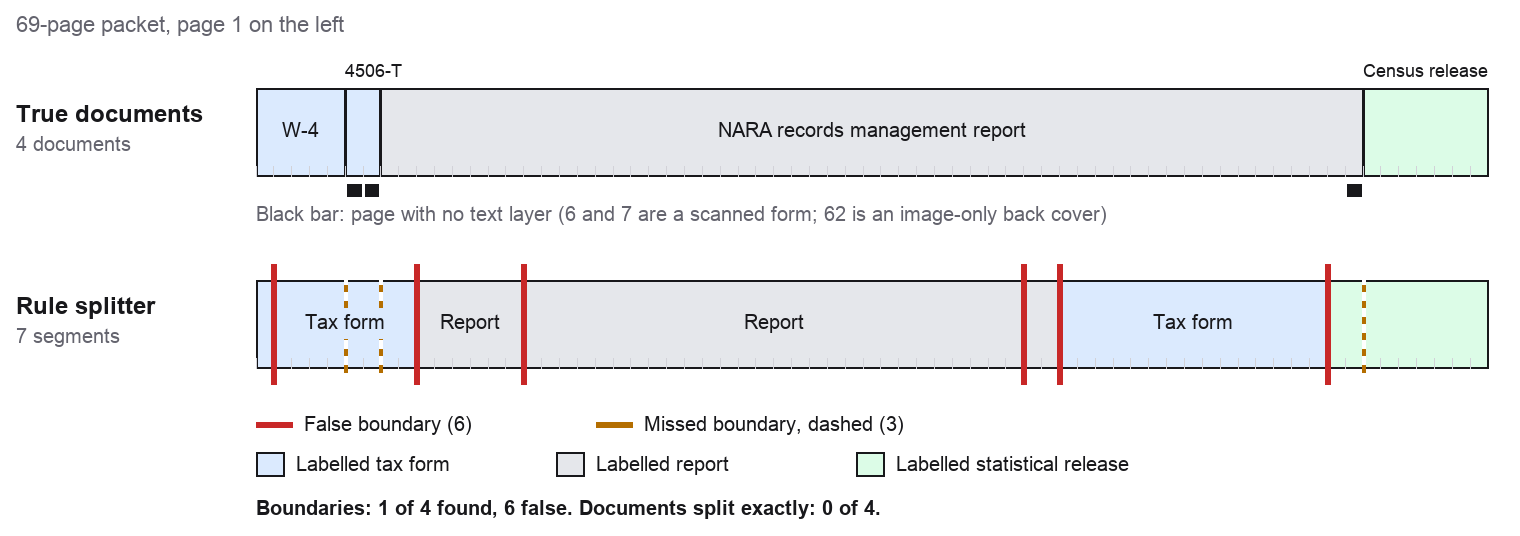
| Rule splitter's part | Its label | What the pages really are |
|---|---|---|
| 1 | tax_form | W-4 page 1 only |
| 2–9 | tax_form | Rest of the W-4, the whole scanned 4506-T, and the report's cover and foreword |
| 10–15 | report | Report: executive summary |
| 16–43 | report | Report: introduction and main sections |
| 44–45 | report | Report: Appendix I |
| 46–60 | tax_form | Report: Appendix II, tables of agency scores |
| 61–69 | statistical_release | Report: Appendix III and its image-only back cover, then the whole Census release |
Scored against the boundaries we wrote down first: 7 parts instead of 4, 1 of 4 true boundaries found, 6 false ones, and 0 of 4 documents split exactly. Giving each page the label of the part it landed in, 50 of 69 pages (72%) ended up with the right label, mostly because the 55-page report dominates the packet.
Where the rules broke
- A stray number read as a page number. The W-4's first page ends with “see page 4”. The footer rule read that as page 4, so the real “Page 2” looked like a restart and split the form in two.
- Scanned pages are invisible. The 4506-T has no text layer, so no rule could fire on it. It was folded into the W-4 part, with nothing to say a second form had started. To read a scanned part, see how to extract text from a scanned PDF.
- Page numbers restart inside one document. The report starts again at “Page 1” for its executive summary, its introduction and each of three appendices. That made 5 of the 6 false boundaries.
- Real boundaries with no signal. The report's cover has no page number and no text in its top third, so the title rule never saw it. The Census release has no page numbers in its text, no form header and the same page size, so nothing marked where it began.
- Keywords miss or default. Appendix II is 15 pages of score tables. Its first three pages, the only ones the labeller reads, matched no keyword, so our code fell back to the first label in the list,
tax_form. The text layer did not help either: the report's small-caps heading “Executive Summary” came out as “E S” and “XECUTIVE UMMARY”.
Only the two page-number rules ever fired. Switch them off and nothing fires at all: the whole 69-page packet comes back as one document. Each fix is possible (ignore “see page”, allow restarts after an appendix heading, add OCR for scans, add an “unknown” label), but each one is written for one publisher's layout, and the next packet brings a new one.
Rules are the right tool when every packet comes from one system you control: a fixed template, born-digital pages, or a barcode or separator sheet between documents. For packets from customers, brokers or other agencies, that assumption fails.
Split a PDF packet: which route fits?
Published by HyperAPI. We rank ourselves first on the criteria below; check them against your own documents.
| Route | HyperAPI split + classify | Rule-based script (pdfplumber) | Manual review |
|---|---|---|---|
| Your own labels | Yes, each with a description | Only as keyword lists | Yes |
| What comes back | Page ranges, label, confidence 0–10, identifying features; then type, confidence label, domain and needs-review per part | Whatever your rules emit | A person's judgement |
| Pages with no text layer | Accepted like any PDF or image | Skipped unless you add OCR | Yes |
| Cost for this 69-page packet | $3.45 split, $6.90 with classify; 30 free pages a month | Free; your time to write and maintain rules | Staff time per page |
| Best for | Packets from many sources, inside your own code | One fixed template, born-digital, or separator sheets | Low volume, or checking the cases flagged for review |
Why HyperAPI for packets
- Your labels, in plain English. Each class carries a description, and
standalonemarks page types that always start a new document. - Output you can act on. Page ranges with a 0 to 10 confidence and the features that identify each document from split; a needs-review flag and a financial or non-financial domain from classify.
- Five operations on one key. The same
document_keyworks for parse, extract, classify, split and redact, so the next step is one more call: parse each part (see PDF parsing in Python) or mask names before sharing (see our PII redaction guide). - Inputs as they arrive. PDF, PNG, JPEG, WebP, TIFF, HEIC, Word, Excel, PowerPoint, CSV, TXT and RTF, up to 50 MB per file.
- Clear data handling. Each request's input and result are kept 30 days, retrievable by
request_id, then deleted, and are not used for training. HyperAPI is SOC 2 Type II.
Frequently asked questions
What is AI document classification?
Software that reads a document and returns what kind it is, such as an invoice, a tax form or a report, so it can be routed. With HyperAPI, classify returns the type, a confidence label, a financial or non-financial domain and a needs-review flag for $0.05 per page.
How do I split a PDF into separate documents automatically?
Send it to a split API and cut the file at the page ranges it returns. With HyperAPI: upload the PDF, call POST /v1/split with your labels in segment_classes, and read result.segmentation.splits. A free rule-based script works only when every packet follows one layout.
Which API can split a PDF packet and classify each part?
HyperAPI does both on one key: split returns page ranges with your own labels and a 0 to 10 confidence, and classify returns a document type, a confidence label and a needs-review flag. Each costs $0.05 per page, with 30 free pages a month. We publish HyperAPI, so test it on a short packet of your own before you decide.
How much does document classification cost per page?
HyperAPI charges $0.05 per page for classify and $0.05 for split. Each page counts once per operation, so our 69-page packet costs $3.45 to split and $6.90 to split and classify. Repeats of the same document within 24 hours are free.
Can I split a PDF packet in Python without an API?
Yes, with page rules in pdfplumber, but test them on real packets. On our 69-page public packet, five rules found 1 of 4 true boundaries, added 6 false ones and could not see a scanned form at all.
How we tested
Packet: IRS Form W-4 (2026) and Form 4506-T from irs.gov, the NARA Federal Agency Records Management 2024 Annual Report from archives.gov, and the Census Bureau New Residential Construction release of 20 October 2026 from census.gov, all downloaded on 18 November 2026. They are US government works in the public domain. We rendered the 4506-T to 150 DPI images to make it image-only.
True boundaries were recorded before the splitter was written. Rule run: MacBook Pro, Apple M1, 16 GB RAM, macOS 14.5, Python 3.12.4, pdfplumber 0.11.9, pypdfium2 4.30.0. No HyperAPI split or classify call was made for this post; the responses shown are the documented examples.
Have a packet to sort? Sign up for 30 free pages a month, no card needed, and send it to split. The Split API reference lists every option, and classify is documented beside it.